> ## Documentation Index
> Fetch the complete documentation index at: https://docs.ruleinside.com/llms.txt
> Use this file to discover all available pages before exploring further.
# Agent settings
> Every setting in the agent editor: what it does, the values it accepts, its default and the edit level it needs.
The agent editor is where you shape one agent: what it says first, how it sounds and listens, how long calls last,
its instructions and, if it is switched on for your account, where it hands callers over to a person. To open it,
click **Agents** in the sidebar (see [Managing your agents](/managing-agents)).
We suggest you start with a handful of settings: the greeting in [First message](#first-message), the
[Voice](#voice), the [Language](#language), [Turn taking](#turn-taking) when the agent feels slow or talks over
callers, and [Call limits](#call-limits). You can usually leave the rest as it is. Under many of the tables below,
a **Recommended** note says when it is worth changing a setting.
The editor has two columns:
* **Left:** **First message**, **Personalization variables**, **Transfer to a person**, **Conversation** and
**System prompt**.
* **Right:** **Configuration** (**Name**, **Voice**, **Language**, **Language model**, **Turn taking**, **Call
limits**, **Conversation behaviour**), then **Knowledge base** and **Tools**. Each Configuration row except Name
opens a side panel.
## Who can change a setting
You can change a setting only when **both** of these are true:
1. You are an **owner** of the account. Members can open every agent and read every setting, but all fields are
greyed out for them and they see: "Only account owners can change agents, ask an owner of your team to make
edits." See [Who can do what](/roles).
2. The agent's **edit level** allows that setting. A setting above the agent's level shows a padlock or is greyed
out.
### Edit levels
Every agent has one of four edit levels. The level is shown as a badge in the editor header and under the agent's
name in the agents list. Each level includes everything in the levels above it in this table.
| Level | What you can change |
| - | - |
| **View only** | Nothing. A banner says: "Your plan is view-only. Contact us to change your agent, or upgrade for self-service editing." The save bar never appears. |
| **Name, voice & greeting** | **Name**, the choice of **Voice**, the **First message** text and **Personalization variables**. |
| **Instructions** | **Language**; **Creativity (temperature)**; **Stability**, **Speed**, **Similarity** and **Latency optimisation**; everything in **Turn taking**, **Call limits** (except voicemail) and **Conversation behaviour**; **Store timezone**; **Transfer to a person**; **Additional instructions**; **Who speaks first** and the wait for the caller; **Recording notice**. |
| **Full control** | **TTS model family**, **Audio output format**, **Text normalisation**, **Max response length (tokens)**, the whole **System prompt** (it takes the place of Additional instructions), the **System tools** switches, and all changes on the [Tools](/tools) and [Knowledge](/knowledge) pages, including **Configure RAG**. |
* Agents you create yourself (blank or cloned) always start at **Full control**.
* Your main agent, the one RuleInside set up for you, keeps the level RuleInside set for it. It carries the
**Managed** badge, which only marks it as your main agent: the edit level, not the badge, decides what you can
change.
* Some settings can never be changed from the portal, at any level: the language model name and its reasoning
setting, the voicemail message, **Transfer to agent**, RuleInside's own store tools and knowledge documents, and
RuleInside's sections of the prompt. Contact RuleInside if you need one of these changed.
The settings that need **Full control** are the ones that can stop an agent working properly when set wrongly.
For example, a wrong audio output format breaks the sound on phone calls.
## Saving your changes
When you change something, a bar appears at the bottom of the page with two buttons:
* **Discard** puts every field back to the values loaded with the page.
* **Save changes** sends your changes (the button shows "Saving…" while it works). Every field is locked until
the save finishes.
What to know about saving:
* Only fields you changed, and are allowed to change, are sent. If there is nothing to send you see "No changes
to save."
* **Closing a side panel does not save it.** Changes in the Voice, Language, Language model, Turn taking, Call
limits and Conversation behaviour panels, the First message card, transfer numbers, time zone and prompt all
save together when you click **Save changes**.
* If a field is empty or out of range you see "Some settings need fixing before this can be saved. Open the
highlighted section to see what." Nothing is saved. Open the highlighted panel to find the message under the
field.
* On success you see "Agent updated." and the form reloads with the saved values. The change applies to the live
agent.
* If the save is refused you see the reason, for example "Not permitted at this agent's edit level (…): …", or
"Could not update the agent."
Two things do **not** use the save bar and save as soon as you click: **Personalization variables** (they have
their own **Save variables** button) and the **System tools** switches on the [Tools](/tools) page.
## First message
The **First message** card sets how the call opens. Its description reads "The first thing customers hear." or,
when the caller speaks first, "What the agent says after the caller answers."
| Field | What it does | Values and limits | Default | Edit level |
| - | - | - | - | - |
| **Who speaks first** | Who talks first when the call connects | **Agent speaks first**: "The agent says the greeting as soon as the call connects." **Caller speaks first**: the agent waits for the person to answer ("Hello?"), then says the greeting. | As set on the agent | Instructions |
| **Wait for the caller to speak (seconds)** | Shown only with **Caller speaks first**. How long the agent waits for the caller to speak first. | 1 to 30, or empty. Empty uses the reply wait from **Turn taking**. | Not set | Instructions |
| **Recording notice** | Where the agent says the call may be recorded | **In the opening line**: "The greeting itself says the call may be recorded." **After the first exchanges**: the agent says it once, in its second or third reply. If the person objects to being recorded, it says someone from the team will get back to them and ends the call. | As set on the agent | Instructions |
| **What the agent says** | Shown only with **After the first exchanges**. The recording sentence, said word for word. | Up to 500 characters. Required while this option is chosen. | Empty (placeholder "This call may be recorded for quality purposes.") | Instructions |
| First message text box | The greeting | Up to 1,000 characters. Required with **Agent speaks first**. | Placeholder "Hi! How can I help you today?" | Name, voice & greeting |
Recommended:
* **First message text:** keep it short, and say that the caller is speaking with an AI assistant and that the
call may be recorded (the portal's own hint under the box asks for both).
* **Who speaks first:** keep **Agent speaks first** for most stores, so callers hear the greeting straight away.
Choose **Caller speaks first** if you would rather the agent waited for the person to say "Hello?" first.
* **Wait for the caller to speak (seconds):** leave it empty, so it uses the reply wait from **Turn taking**. Set a
value only if you want a different wait at the very start of the call.
* **Recording notice:** keep **In the opening line** unless your greeting feels too long. Then choose **After the
first exchanges** and move the recording sentence into **What the agent says**.
* **What the agent says:** one short sentence is enough, for example "This call may be recorded for quality
purposes."
Good to know:
* The greeting should tell callers they are speaking with an AI assistant and that the call may be recorded. The
portal does not stop you saving a greeting without them, but always include them.
* With **After the first exchanges**, the greeting must still say the caller is talking to an AI assistant. Take
the recording sentence out of the greeting, or it will be said twice.
* **Wait for the caller to speak (seconds)** is the same setting as **Wait at the start of the call (seconds)**
under [Call limits](#call-limits). Changing one changes the other.
* **Caller speaks first** needs the **Instructions** level. At **Name, voice & greeting**, a greeting you type
makes the agent speak first.
* If **Who speaks first** and **Recording notice** are not shown on your agent, contact RuleInside.
## Personalization variables
Values your storefront passes in when a call starts, such as the customer's first name. Use one in the first
message or the instructions by writing its name in double curly braces, for example `{{first_name}}`. The default
is used when no value is passed in.
| Field or button | What it does | Values and limits |
| - | - | - |
| Name box | The variable's name (placeholder "name (e.g. first\_name)") | Starts with a letter; letters, numbers and underscores; up to 64 characters |
| Default box | The value used when none is passed in (placeholder "default (e.g. there)") | Up to 500 characters; longer text is cut |
| Trash button (**Remove variable**) | Removes the row from the form | |
| **Add variable** | Adds an empty row | Up to 30 variables |
| **Save variables** | Saves the whole list straight away ("Saving…" while it works) | |
* Edit level: **Name, voice & greeting**. The card is hidden on a **View only** agent. When you cannot edit, the
boxes are greyed out and the card says "This agent is managed, variables are configured by RuleInside."
* **Save variables** replaces your whole list. A row you removed is deleted when you save, and rows with an empty
name are dropped. On success: "Variables saved." On failure: the reason, or "Could not save variables."
* Some names are reserved by RuleInside: names starting with `system__` or `secret__`, and names that start and
end with an underscore. They are refused with "'…' is a reserved variable name." RuleInside's own variables are
never shown here and never removed by your save.
* When the list is empty the card shows "No variables yet."
## Transfer to a person
"The agent hands the caller over to one of your numbers when the situation calls for it. Works on phone calls
only."
This card appears when RuleInside has switched transfers on for your account. If transfers are not switched on
but RuleInside already set one up for this agent, the card shows: "RuleInside set this transfer up for you. You can
remove it here at any time. To add a number or change when the agent transfers, contact RuleInside support." In
that case the fields are read-only, there is no add button, and the **Remove** buttons still work.
Each transfer rule has:
| Field | What it does | Values and limits |
| - | - | - |
| **Phone number** | The number the caller is handed over to | International format: `+` then 7 to 15 digits, for example `+15551234567` |
| **When to transfer** | When the agent should hand over (placeholder "The caller asks to speak with a person, or the agent cannot help.") | Required, up to 500 characters |
| **Remove** (trash button) | Deletes this rule from the form | |
* **Add a number** adds a rule. You can have up to 5; the button is greyed out at 5.
* Edit level: **Instructions**, owners only. Rules save with **Save changes**.
* With no rules the card says "No transfer numbers. The agent never hands a call over." Removing every rule
switches transfers off.
* RuleInside keeps a record of every change to transfer numbers and who made it.
A number is refused when:
| Situation | Message you see |
| - | - |
| Your account has no active phone number yet | "Transfers need a phone number on this store first." |
| One of your store's numbers cannot be read | "This store has a phone number we cannot read (…); fix it under Phone numbers before setting a transfer." |
| It is your store's own number | "… is this store's own number; the agent would call itself." |
| It is not a valid number | "… is not a valid phone number." |
| It is not a mobile, landline or toll-free number (for example premium rate, shared cost or VoIP) | "… cannot be used for transfers. Use a mobile or landline number." |
| It is in a different country from your store's phone numbers | "… is in a different country from this store's phone number." |
| The same number is entered twice | "Each transfer number may appear only once." |
| Transfers are not switched on and you add or change a rule | "Transfer to a person is not enabled for this account. You can remove a transfer, but not add or change one." |
If the agent has a kind of transfer the portal cannot display, the card says "This agent has transfers that cannot
be shown or changed here. Contact RuleInside support to change them." and nothing can be changed.
## Conversation
The **Conversation** card is marked "Managed by RuleInside." and has a padlock, but one field in it is yours:
* **Store timezone** (edit level **Instructions**): a list of time zones such as Europe/Rome, plus UTC and **Not
set**. "Lets the agent tell callers the right local time, for example whether the shop is open now." Saves with
**Save changes**. Anything other than a real zone name is refused with "Timezone must be a real zone name, e.g.
Europe/Rome."
* **Variables** ("Identity & call context"): the variables RuleInside passes into every call. Shown for
information only; never editable.
## System prompt
What the **System prompt** card shows depends on the agent's edit level.
| Edit level | What you see | What you can do |
| - | - | - |
| **Full control** | "The full agent prompt. Platform sections must stay intact, saving without them is rejected." | Edit the whole prompt in one box, up to 20,000 characters. |
| **Instructions** | "Add your own guidance on top of the managed instructions. Platform behaviour (memory, store lookups, call handling) stays managed." | Write in **Additional instructions** (up to 8,000 characters; "Added to your agent's instructions. Leave blank to remove."). Click **Show** under **Current agent instructions (managed)** to read the full prompt. |
| **Name, voice & greeting** or **View only** | "How your agent behaves today." | Read the full prompt under **Current agent instructions (managed)**. |
* **Additional instructions** are added to the prompt in their own section; the rest of the prompt is never
touched. Saving the box empty removes that section.
* At **Full control**, if your agent's prompt contains RuleInside's platform sections, they must still be there
when you save. Otherwise the save is refused with "Your system prompt must keep its platform sections (…).
Restore them and save again." A blank agent you created has no platform sections.
* The opening greeting (when the caller speaks first) and the recording sentence (when said after the first
exchanges) are kept in their own sections. They are not shown in this box and are kept automatically when you
save the prompt.
## Name
**Name** (edit level **Name, voice & greeting**): 1 to 100 characters. An empty name is refused. The new name
also appears in the agent selector and the agents list.
## Voice
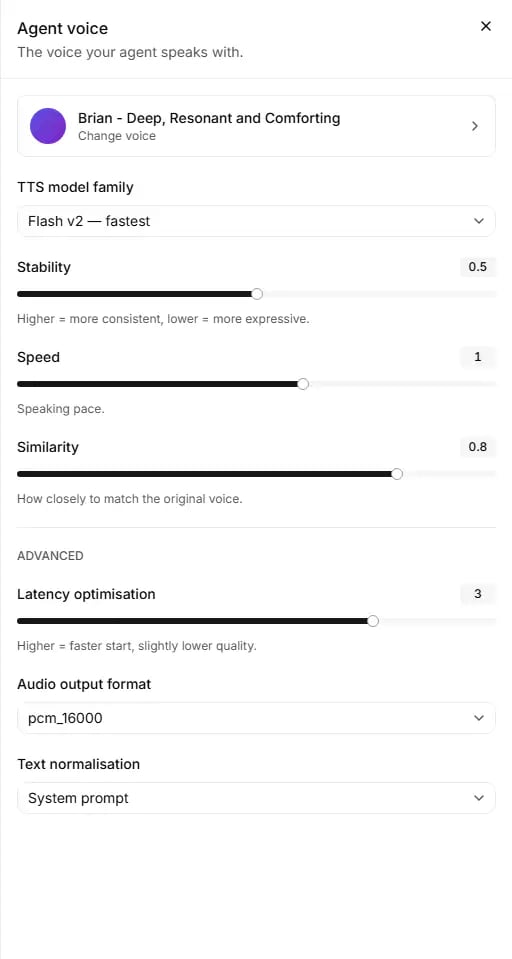 The **Voice** row shows the voice's picture, name and accent (or "Choose a voice"). Click it to open **Agent
voice**: "The voice your agent speaks with." The defaults below are what the panel shows when the agent has no
value set.
| Field | What it does | Values | Default | Edit level |
| - | - | - | - | - |
| Voice button (**Change voice**) | Opens the voice picker | Any voice in your voices or the library | | Name, voice & greeting |
| **TTS model family** | The speech engine | Flash v2 (fastest), Flash v2.5 (fast, multilingual), Turbo v2 (balanced), Turbo v2.5 (balanced, multilingual), Multilingual v2 (quality), v3 Conversational | Flash v2 | Full control |
| **Stability** | "Higher = more consistent, lower = more expressive." | 0 to 1, in steps of 0.05 | 0.5 | Instructions |
| **Speed** | "Speaking pace." | 0.7 to 1.2, in steps of 0.05 | 1 | Instructions |
| **Similarity** | "How closely to match the original voice." | 0 to 1, in steps of 0.05 | 0.75 | Instructions |
| **Latency optimisation** (under **Advanced**) | "Higher = faster start, slightly lower quality." | 0 to 4, whole numbers | 3 | Instructions |
| **Audio output format** | The sound format the agent sends | pcm\_8000, pcm\_16000, pcm\_22050, pcm\_24000, pcm\_44100, pcm\_48000, ulaw\_8000 | pcm\_16000 | Full control |
| **Text normalisation** | How numbers and symbols are turned into speech | **System prompt** or **Automatic** | System prompt | Full control |
**The language and the speech engine must match.** An English agent cannot use Flash v2.5 or Turbo v2.5, and an
agent in any other language cannot use Flash v2 or Turbo v2. A save that breaks this rule is refused with a message
that names the fix. Below Full control the message says "Pick a different language, or contact support to change
the voice model for you."
Recommended:
* **Voice:** choose a voice that speaks your callers' language and suits your store. Use **Play sample** to listen
before you choose (see [Choosing a voice](#choosing-a-voice)).
* **TTS model family:** leave it as set. A wrong choice can stop the agent working properly, and it must match the
language. Contact RuleInside if you think it needs changing.
* **Stability:** keep the default unless the voice sounds too flat (lower it for a more expressive voice) or too
changeable (raise it for a more consistent one).
* **Speed:** keep 1 unless callers find the agent too fast or too slow. Change it in small steps and test with
[Preview](/managing-agents#testing-an-agent-with-preview) after saving.
* **Similarity:** keep the default unless the agent does not sound close enough to the voice you chose; then raise
it.
* **Latency optimisation:** keep the default. Higher values give a faster start with slightly lower sound quality.
If the agent feels slow to answer, look at [Turn taking](#turn-taking) first: the editor says that is usually what
people mean.
* **Audio output format:** leave it as set and contact RuleInside if you think it needs changing. A wrong format
breaks the sound on phone calls.
* **Text normalisation:** leave it as set and contact RuleInside if numbers or symbols are read out wrongly.
### Choosing a voice
**Change voice** opens **Select a voice** (use **Back** to return).
* **My Voices**: the voices already in your account. **Explore**: the public voice library.
* Search with "Search your voices…" or "Search the library…".
* Filter with **Language** (English, Italian, Spanish, French, German, Portuguese, Dutch, Polish, Turkish, Arabic,
Hindi, Japanese, Korean, Chinese), **Category** (Professional, Famous, High quality), **Gender** (Female, Male,
Neutral) and **Age** (Young, Middle-aged, Old).
* **Play sample** plays a voice before you choose it, when a sample exists.
* **Explore** shows up to 40 results ("Searching…" while it looks). "No voices found." means nothing matched.
What happens when you pick a voice:
* A voice from **My Voices** only changes the form. It is saved when you click **Save changes**.
* A voice from **Explore** is first added to your voices ("Voice added to your workspace." or, if it fails,
"Could not add that voice.") and then selected. If you already have a voice with the same name, that one is
used. **The voice stays in your voices even if you then discard the change.**
* A voice you just added can take up to 5 minutes to appear under **My Voices** and in the Voice row.
## Language
The **Voice** row shows the voice's picture, name and accent (or "Choose a voice"). Click it to open **Agent
voice**: "The voice your agent speaks with." The defaults below are what the panel shows when the agent has no
value set.
| Field | What it does | Values | Default | Edit level |
| - | - | - | - | - |
| Voice button (**Change voice**) | Opens the voice picker | Any voice in your voices or the library | | Name, voice & greeting |
| **TTS model family** | The speech engine | Flash v2 (fastest), Flash v2.5 (fast, multilingual), Turbo v2 (balanced), Turbo v2.5 (balanced, multilingual), Multilingual v2 (quality), v3 Conversational | Flash v2 | Full control |
| **Stability** | "Higher = more consistent, lower = more expressive." | 0 to 1, in steps of 0.05 | 0.5 | Instructions |
| **Speed** | "Speaking pace." | 0.7 to 1.2, in steps of 0.05 | 1 | Instructions |
| **Similarity** | "How closely to match the original voice." | 0 to 1, in steps of 0.05 | 0.75 | Instructions |
| **Latency optimisation** (under **Advanced**) | "Higher = faster start, slightly lower quality." | 0 to 4, whole numbers | 3 | Instructions |
| **Audio output format** | The sound format the agent sends | pcm\_8000, pcm\_16000, pcm\_22050, pcm\_24000, pcm\_44100, pcm\_48000, ulaw\_8000 | pcm\_16000 | Full control |
| **Text normalisation** | How numbers and symbols are turned into speech | **System prompt** or **Automatic** | System prompt | Full control |
**The language and the speech engine must match.** An English agent cannot use Flash v2.5 or Turbo v2.5, and an
agent in any other language cannot use Flash v2 or Turbo v2. A save that breaks this rule is refused with a message
that names the fix. Below Full control the message says "Pick a different language, or contact support to change
the voice model for you."
Recommended:
* **Voice:** choose a voice that speaks your callers' language and suits your store. Use **Play sample** to listen
before you choose (see [Choosing a voice](#choosing-a-voice)).
* **TTS model family:** leave it as set. A wrong choice can stop the agent working properly, and it must match the
language. Contact RuleInside if you think it needs changing.
* **Stability:** keep the default unless the voice sounds too flat (lower it for a more expressive voice) or too
changeable (raise it for a more consistent one).
* **Speed:** keep 1 unless callers find the agent too fast or too slow. Change it in small steps and test with
[Preview](/managing-agents#testing-an-agent-with-preview) after saving.
* **Similarity:** keep the default unless the agent does not sound close enough to the voice you chose; then raise
it.
* **Latency optimisation:** keep the default. Higher values give a faster start with slightly lower sound quality.
If the agent feels slow to answer, look at [Turn taking](#turn-taking) first: the editor says that is usually what
people mean.
* **Audio output format:** leave it as set and contact RuleInside if you think it needs changing. A wrong format
breaks the sound on phone calls.
* **Text normalisation:** leave it as set and contact RuleInside if numbers or symbols are read out wrongly.
### Choosing a voice
**Change voice** opens **Select a voice** (use **Back** to return).
* **My Voices**: the voices already in your account. **Explore**: the public voice library.
* Search with "Search your voices…" or "Search the library…".
* Filter with **Language** (English, Italian, Spanish, French, German, Portuguese, Dutch, Polish, Turkish, Arabic,
Hindi, Japanese, Korean, Chinese), **Category** (Professional, Famous, High quality), **Gender** (Female, Male,
Neutral) and **Age** (Young, Middle-aged, Old).
* **Play sample** plays a voice before you choose it, when a sample exists.
* **Explore** shows up to 40 results ("Searching…" while it looks). "No voices found." means nothing matched.
What happens when you pick a voice:
* A voice from **My Voices** only changes the form. It is saved when you click **Save changes**.
* A voice from **Explore** is first added to your voices ("Voice added to your workspace." or, if it fails,
"Could not add that voice.") and then selected. If you already have a voice with the same name, that one is
used. **The voice stays in your voices even if you then discard the change.**
* A voice you just added can take up to 5 minutes to appear under **My Voices** and in the Voice row.
## Language
 **Default language** (edit level **Instructions**): "The default language your agent communicates in." Choose from
English, Italian, Spanish, French, German, Portuguese, Dutch, Polish, Swedish, Danish, Norwegian, Finnish, Turkish,
Arabic, Hindi, Japanese, Korean and Chinese. Saves with **Save changes**.
If the agent's current language is not in this list, the row shows its language code. Changing the language must
respect the language and speech engine rule under [Voice](#voice).
Recommended: set **Default language** to the language most of your callers speak. If the save is refused because of
the voice model, contact RuleInside (or, at Full control, change **TTS model family** in the same save).
## Language model
**Default language** (edit level **Instructions**): "The default language your agent communicates in." Choose from
English, Italian, Spanish, French, German, Portuguese, Dutch, Polish, Swedish, Danish, Norwegian, Finnish, Turkish,
Arabic, Hindi, Japanese, Korean and Chinese. Saves with **Save changes**.
If the agent's current language is not in this list, the row shows its language code. Changing the language must
respect the language and speech engine rule under [Voice](#voice).
Recommended: set **Default language** to the language most of your callers speak. If the save is refused because of
the voice model, contact RuleInside (or, at Full control, change **TTS model family** in the same save).
## Language model
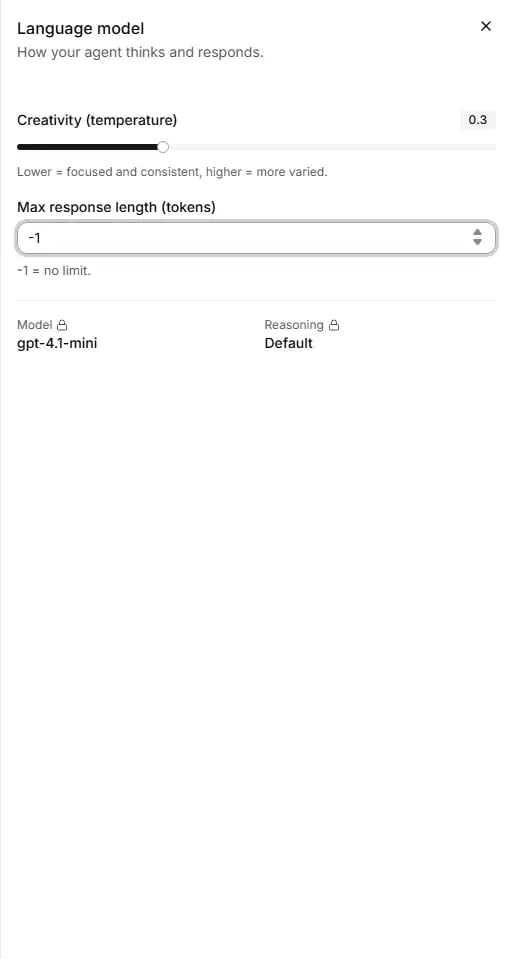 The row shows the model RuleInside set for the agent. You cannot change it. The panel reads "How your agent thinks
and responds."
| Field | What it does | Values | Default | Edit level |
| - | - | - | - | - |
| **Creativity (temperature)** | "Lower = focused and consistent, higher = more varied." | 0 to 1, in steps of 0.05 | 0.5 | Instructions |
| **Max response length (tokens)** | The longest answer the agent may give. Shown only when you can change it. | -1 or 0 for no limit, or 50 to 100,000. 1 to 49 is refused: "Max response length must be -1 (no limit) or at least 50." | -1 (no limit) | Full control |
| **Model** | The model RuleInside set for the agent | Set by RuleInside | | Never |
| **Reasoning** | The model's reasoning setting ("Default" when not set) | Set by RuleInside | | Never |
Recommended:
* **Creativity (temperature):** keep the default. Lower it if you want more focused, consistent answers; raise it
only if answers sound too repetitive.
* **Max response length (tokens):** keep -1 (no limit). If you want shorter answers, ask for them in your
instructions instead (see [Writing instructions](/writing-instructions)).
* **Model** and **Reasoning:** nothing to do. Contact RuleInside if you have a question about them.
## Turn taking
The row shows the model RuleInside set for the agent. You cannot change it. The panel reads "How your agent thinks
and responds."
| Field | What it does | Values | Default | Edit level |
| - | - | - | - | - |
| **Creativity (temperature)** | "Lower = focused and consistent, higher = more varied." | 0 to 1, in steps of 0.05 | 0.5 | Instructions |
| **Max response length (tokens)** | The longest answer the agent may give. Shown only when you can change it. | -1 or 0 for no limit, or 50 to 100,000. 1 to 49 is refused: "Max response length must be -1 (no limit) or at least 50." | -1 (no limit) | Full control |
| **Model** | The model RuleInside set for the agent | Set by RuleInside | | Never |
| **Reasoning** | The model's reasoning setting ("Default" when not set) | Set by RuleInside | | Never |
Recommended:
* **Creativity (temperature):** keep the default. Lower it if you want more focused, consistent answers; raise it
only if answers sound too repetitive.
* **Max response length (tokens):** keep -1 (no limit). If you want shorter answers, ask for them in your
instructions instead (see [Writing instructions](/writing-instructions)).
* **Model** and **Reasoning:** nothing to do. Contact RuleInside if you have a question about them.
## Turn taking
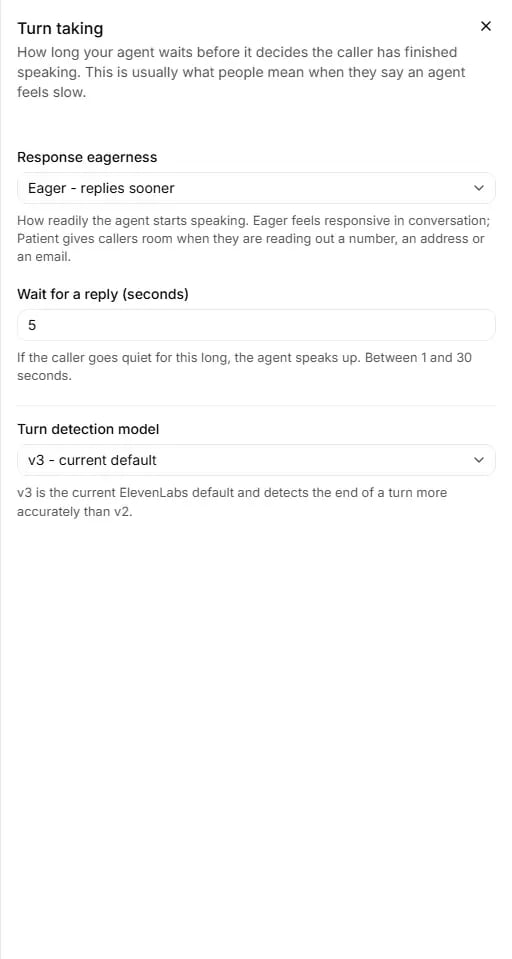 "How long your agent waits before it decides the caller has finished speaking. This is usually what people mean
when they say an agent feels slow." The row summarises the current eagerness and wait, or says "Using default
pacing". All fields need the **Instructions** level.
| Field | What it does | Values | Default |
| - | - | - | - |
| **Response eagerness** | "How readily the agent starts speaking. Eager feels responsive in conversation; Patient gives callers room when they are reading out a number, an address or an email." | Patient - waits longer, Normal, Eager - replies sooner | Normal |
| **Wait for a reply (seconds)** | "If the caller goes quiet for this long, the agent speaks up." | 1 to 30. Cannot be left empty. | 7 |
| **Turn detection model** | How the end of the caller's turn is detected. v3 is the current default and detects the end of a turn more accurately than v2. | v3 - current default, v2 - previous | v3 |
Recommended:
* **Response eagerness:** keep **Normal** for most stores. Choose **Eager** if the agent feels slow to answer.
Choose **Patient** if callers often read out order numbers, addresses or email addresses and the agent starts
talking before they finish.
* **Wait for a reply (seconds):** keep 7. A shorter wait makes the agent speak up sooner when the caller goes quiet;
a longer one gives callers time to find something, such as an order number.
* **Turn detection model:** keep v3.
## Call limits
"How long your agent waits before it decides the caller has finished speaking. This is usually what people mean
when they say an agent feels slow." The row summarises the current eagerness and wait, or says "Using default
pacing". All fields need the **Instructions** level.
| Field | What it does | Values | Default |
| - | - | - | - |
| **Response eagerness** | "How readily the agent starts speaking. Eager feels responsive in conversation; Patient gives callers room when they are reading out a number, an address or an email." | Patient - waits longer, Normal, Eager - replies sooner | Normal |
| **Wait for a reply (seconds)** | "If the caller goes quiet for this long, the agent speaks up." | 1 to 30. Cannot be left empty. | 7 |
| **Turn detection model** | How the end of the caller's turn is detected. v3 is the current default and detects the end of a turn more accurately than v2. | v3 - current default, v2 - previous | v3 |
Recommended:
* **Response eagerness:** keep **Normal** for most stores. Choose **Eager** if the agent feels slow to answer.
Choose **Patient** if callers often read out order numbers, addresses or email addresses and the agent starts
talking before they finish.
* **Wait for a reply (seconds):** keep 7. A shorter wait makes the agent speak up sooner when the caller goes quiet;
a longer one gives callers time to find something, such as an order number.
* **Turn detection model:** keep v3.
## Call limits
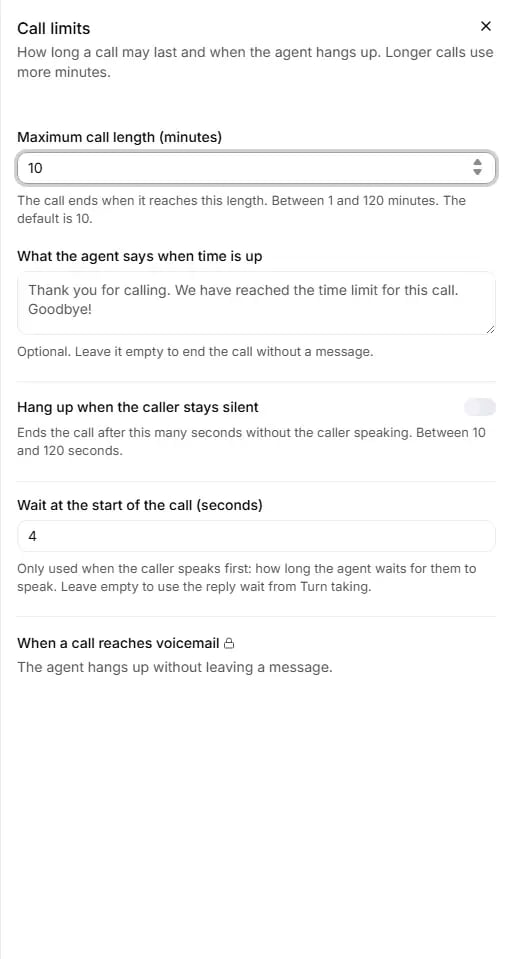 "How long a call may last and when the agent hangs up. Longer calls use more minutes." The row shows the
maximum, for example "Up to 10 min per call (default)". Every field you can change needs the **Instructions**
level.
| Field | What it does | Values | Default |
| - | - | - | - |
| **Maximum call length (minutes)** | "The call ends when it reaches this length." | 1 to 120. Cannot be left empty. | 10 |
| **What the agent says when time is up** | The goodbye said when the limit is reached | Up to 500 characters. "Optional. Leave it empty to end the call without a message." | Empty |
| **Hang up when the caller stays silent** | A switch that ends the call after a silence | On or off | Off |
| **Seconds of silence** | "Ends the call after this many seconds without the caller speaking." | 10 to 120 | 30 when you switch it on |
| **Wait at the start of the call (seconds)** | "Only used when the caller speaks first: how long the agent waits for them to speak." | 1 to 30, or empty to use the reply wait from Turn taking | Not set |
| **When a call reaches voicemail** | What happens on voicemail | Display only | |
Recommended:
* **Maximum call length (minutes):** keep 10 for most stores. Raise it if real conversations reach the limit (check
the **Duration** column on [Calls](/conversations)). Lower it if you want to cap the minutes a single call can use.
* **What the agent says when time is up:** write a short, polite goodbye, so the call does not end without a word.
* **Hang up when the caller stays silent:** consider switching it on if your calls show long stretches where the
caller has stopped talking.
* **Seconds of silence:** start with 30. We suggest keeping it longer than **Wait for a reply (seconds)** in
[Turn taking](#turn-taking), so the agent speaks up before the call is ended.
* **Wait at the start of the call (seconds):** leave it empty unless you use **Caller speaks first** and want a
different wait at the start.
* **When a call reaches voicemail:** nothing to change here. Contact RuleInside if you need it changed.
**When a call reaches voicemail** can never be changed here. It shows one of "Voicemail detection is off for this
agent.", "The agent hangs up without leaving a message." or a message the agent leaves, with "Contact RuleInside to
change it." It follows the **Voicemail detection** switch on the [Tools](/tools) page. RuleInside's policy is that
the agent hangs up and leaves no message.
## Conversation behaviour
"How long a call may last and when the agent hangs up. Longer calls use more minutes." The row shows the
maximum, for example "Up to 10 min per call (default)". Every field you can change needs the **Instructions**
level.
| Field | What it does | Values | Default |
| - | - | - | - |
| **Maximum call length (minutes)** | "The call ends when it reaches this length." | 1 to 120. Cannot be left empty. | 10 |
| **What the agent says when time is up** | The goodbye said when the limit is reached | Up to 500 characters. "Optional. Leave it empty to end the call without a message." | Empty |
| **Hang up when the caller stays silent** | A switch that ends the call after a silence | On or off | Off |
| **Seconds of silence** | "Ends the call after this many seconds without the caller speaking." | 10 to 120 | 30 when you switch it on |
| **Wait at the start of the call (seconds)** | "Only used when the caller speaks first: how long the agent waits for them to speak." | 1 to 30, or empty to use the reply wait from Turn taking | Not set |
| **When a call reaches voicemail** | What happens on voicemail | Display only | |
Recommended:
* **Maximum call length (minutes):** keep 10 for most stores. Raise it if real conversations reach the limit (check
the **Duration** column on [Calls](/conversations)). Lower it if you want to cap the minutes a single call can use.
* **What the agent says when time is up:** write a short, polite goodbye, so the call does not end without a word.
* **Hang up when the caller stays silent:** consider switching it on if your calls show long stretches where the
caller has stopped talking.
* **Seconds of silence:** start with 30. We suggest keeping it longer than **Wait for a reply (seconds)** in
[Turn taking](#turn-taking), so the agent speaks up before the call is ended.
* **Wait at the start of the call (seconds):** leave it empty unless you use **Caller speaks first** and want a
different wait at the start.
* **When a call reaches voicemail:** nothing to change here. Contact RuleInside if you need it changed.
**When a call reaches voicemail** can never be changed here. It shows one of "Voicemail detection is off for this
agent.", "The agent hangs up without leaving a message." or a message the agent leaves, with "Contact RuleInside to
change it." It follows the **Voicemail detection** switch on the [Tools](/tools) page. RuleInside's policy is that
the agent hangs up and leaves no message.
## Conversation behaviour
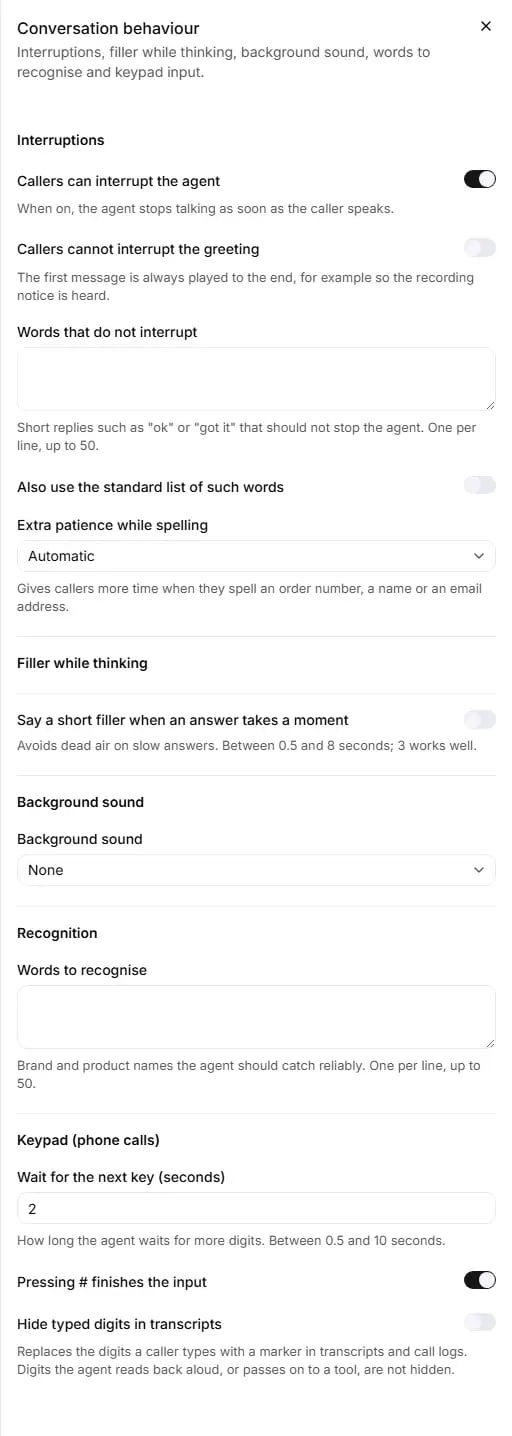 "Interruptions, filler while thinking, background sound, words to recognise and keypad input." The row shows
"Interruptions on" or "Interruptions off". Every field needs the **Instructions** level. Where a field was never
set, the default shown is the value the call actually uses.
### Interruptions
| Field | What it does | Values | Default |
| - | - | - | - |
| **Callers can interrupt the agent** | "When on, the agent stops talking as soon as the caller speaks." | On or off | On |
| **Callers cannot interrupt the greeting** | "The first message is always played to the end, for example so the recording notice is heard." | On or off | Off |
| **Words that do not interrupt** | "Short replies such as "ok" or "got it" that should not stop the agent." | One per line, up to 50 lines, each up to 50 characters. Blank lines are dropped. | Empty |
| **Also use the standard list of such words** | Adds a standard list of such words to yours | On or off | Off |
| **Extra patience while spelling** | "Gives callers more time when they spell an order number, a name or an email address." | **Automatic** or **Off** | Automatic |
If the current interruption setting could not be read, the switch is locked and says "The current setting could
not be read, so it cannot be changed right now." The row then shows "Settings".
Recommended:
* **Callers can interrupt the agent:** keep it on, so the agent stops talking as soon as the caller speaks, as a
person would on the phone.
* **Callers cannot interrupt the greeting:** switch it on if your greeting carries the recording notice and you
want it always heard in full.
* **Words that do not interrupt:** add the short replies your callers use, in their language, if the agent stops
talking when they say "ok" or "yes".
* **Also use the standard list of such words:** switch it on as a quick start, then add your own words if needed.
* **Extra patience while spelling:** keep **Automatic**.
### Filler while thinking
| Field | What it does | Values | Default |
| - | - | - | - |
| **Say a short filler when an answer takes a moment** | "Avoids dead air on slow answers." | On or off | Off |
| **Say it after (seconds)** | How long to wait before the filler | 0.5 to 8, in steps of 0.5 ("3 works well") | 3 when you switch it on |
| **Filler** | What the agent says (shown while the switch is on) | Up to 200 characters. Required while on. | "Hhmmmm...yeah." |
Recommended: switch the filler on if callers hear silence while the agent works out an answer, for example while
it looks up an order. Keep **Say it after (seconds)** at 3 (the portal says "3 works well"), and write a short
phrase in the agent's language, such as "One moment...".
### Background sound
| Field | What it does | Values | Default |
| - | - | - | - |
| **Background sound** | A sound played behind the agent's voice | None, Office 1, Office 2, Restaurant, City, Typing, Elevator music 1, Elevator music 2, Elevator music 3, Elevator music 4 | None |
| **Background volume** | Its volume (shown only when a sound is chosen) | 0.01 to 1 | 0.15 |
Recommended: keep **None** unless you want a sound behind the agent's voice. If you choose one, keep the volume low,
close to the default, so callers can hear the agent clearly.
### Recognition
**Words to recognise**: "Brand and product names the agent should catch reliably." One per line, up to 50 lines,
each up to 50 characters.
Recommended: add your store's name and the product or brand names callers say most often, especially ones with an
unusual spelling.
### Keypad (phone calls)
| Field | What it does | Values | Default |
| - | - | - | - |
| **Wait for the next key (seconds)** | "How long the agent waits for more digits." | 0.5 to 10, in steps of 0.5 | 2 |
| **Pressing # finishes the input** | Ends the caller's keypad entry when they press # | On or off | On |
| **Hide typed digits in transcripts** | "Replaces the digits a caller types with a marker in transcripts and call logs." | On or off | Off |
Recommended:
* **Wait for the next key (seconds):** keep 2. Raise it if callers type long numbers slowly and get cut off.
* **Pressing # finishes the input:** keep it on.
* **Hide typed digits in transcripts:** switch it on if callers type numbers on the keypad that you do not want in
your transcripts and call logs.
**Hide typed digits in transcripts** hides only the digits the caller types. Digits the agent reads back aloud,
or passes on to a tool, are not hidden.
Saving one keypad, filler or background field never resets the others in the same group.
## Knowledge base and Tools cards
These two cards in the right column are summaries.
* **Knowledge base** ("Documents your agent answers from.") lists the documents attached to the agent, or "No
documents attached yet." It is read-only and has no link. To add or change documents, open
[Knowledge](/knowledge) in the sidebar.
* **Tools** lists every tool on the agent with a type badge: **Store**, **In-page**, **Built-in**,
**Integration** or **Tool**. On a Full control agent it reads "What this agent can do during a call." and
**Manage tools** opens the [Tools](/tools) page. Below Full control it reads "What your agent can do, managed by
RuleInside." The tools shown here as **Store** are the ones labelled **Webhook** on the Tools page.
## Common questions
Panels do not save when you close them. Click **Save changes** in the bar at the bottom of the page.
A field in one of the panels is empty or out of range. The most common cause is an empty **Wait for a reply
(seconds)** or **Maximum call length (minutes)**. Open the highlighted panel to see the message under the
field.
Either you are a member rather than an owner, or the agent's edit level does not include that setting. See
[Edit levels](#edit-levels). Your main agent is often below Full control.
They need **Full control**, because a wrong value can break the sound on phone calls. On your main agent,
RuleInside usually keeps them. Contact RuleInside if you need them changed.
The current speech engine does not support that language. At Full control, change **TTS model family** in the
same save. Below Full control, contact RuleInside to change it for you.
Open **Turn taking**, set **Response eagerness** to Eager and try a shorter **Wait for a reply (seconds)**.
Add those words to **Words that do not interrupt** in **Conversation behaviour**, or switch on **Also use the
standard list of such words**.
Check **Maximum call length (minutes)** and **Hang up when the caller stays silent** in **Call limits**.
Yes. Under **Recording notice**, choose **After the first exchanges** and write the sentence in **What the agent
says**. This needs the **Instructions** level. The greeting must still say the caller is talking to an AI
assistant.
Yes. Under **Who speaks first**, choose **Caller speaks first**. You can also set how long it waits in **Wait
for the caller to speak (seconds)**. This needs the **Instructions** level.
On phone calls, when RuleInside has switched it on for your account. You can add up to 5 mobile, landline or
toll-free numbers in the same country as your store's phone number.
Transfer to a person is not switched on for your account. Removing a transfer is always allowed, so you can stop
one without contacting us. To add or change one, contact RuleInside.
The storefront did not pass in a value for that variable, so its default was used. Check the default under
**Personalization variables**.
On the [Knowledge](/knowledge) and [Tools](/tools) pages, not in the editor.
This documentation is built and hosted on [Mintlify](https://mintlify.com), a developer documentation platform.
"Interruptions, filler while thinking, background sound, words to recognise and keypad input." The row shows
"Interruptions on" or "Interruptions off". Every field needs the **Instructions** level. Where a field was never
set, the default shown is the value the call actually uses.
### Interruptions
| Field | What it does | Values | Default |
| - | - | - | - |
| **Callers can interrupt the agent** | "When on, the agent stops talking as soon as the caller speaks." | On or off | On |
| **Callers cannot interrupt the greeting** | "The first message is always played to the end, for example so the recording notice is heard." | On or off | Off |
| **Words that do not interrupt** | "Short replies such as "ok" or "got it" that should not stop the agent." | One per line, up to 50 lines, each up to 50 characters. Blank lines are dropped. | Empty |
| **Also use the standard list of such words** | Adds a standard list of such words to yours | On or off | Off |
| **Extra patience while spelling** | "Gives callers more time when they spell an order number, a name or an email address." | **Automatic** or **Off** | Automatic |
If the current interruption setting could not be read, the switch is locked and says "The current setting could
not be read, so it cannot be changed right now." The row then shows "Settings".
Recommended:
* **Callers can interrupt the agent:** keep it on, so the agent stops talking as soon as the caller speaks, as a
person would on the phone.
* **Callers cannot interrupt the greeting:** switch it on if your greeting carries the recording notice and you
want it always heard in full.
* **Words that do not interrupt:** add the short replies your callers use, in their language, if the agent stops
talking when they say "ok" or "yes".
* **Also use the standard list of such words:** switch it on as a quick start, then add your own words if needed.
* **Extra patience while spelling:** keep **Automatic**.
### Filler while thinking
| Field | What it does | Values | Default |
| - | - | - | - |
| **Say a short filler when an answer takes a moment** | "Avoids dead air on slow answers." | On or off | Off |
| **Say it after (seconds)** | How long to wait before the filler | 0.5 to 8, in steps of 0.5 ("3 works well") | 3 when you switch it on |
| **Filler** | What the agent says (shown while the switch is on) | Up to 200 characters. Required while on. | "Hhmmmm...yeah." |
Recommended: switch the filler on if callers hear silence while the agent works out an answer, for example while
it looks up an order. Keep **Say it after (seconds)** at 3 (the portal says "3 works well"), and write a short
phrase in the agent's language, such as "One moment...".
### Background sound
| Field | What it does | Values | Default |
| - | - | - | - |
| **Background sound** | A sound played behind the agent's voice | None, Office 1, Office 2, Restaurant, City, Typing, Elevator music 1, Elevator music 2, Elevator music 3, Elevator music 4 | None |
| **Background volume** | Its volume (shown only when a sound is chosen) | 0.01 to 1 | 0.15 |
Recommended: keep **None** unless you want a sound behind the agent's voice. If you choose one, keep the volume low,
close to the default, so callers can hear the agent clearly.
### Recognition
**Words to recognise**: "Brand and product names the agent should catch reliably." One per line, up to 50 lines,
each up to 50 characters.
Recommended: add your store's name and the product or brand names callers say most often, especially ones with an
unusual spelling.
### Keypad (phone calls)
| Field | What it does | Values | Default |
| - | - | - | - |
| **Wait for the next key (seconds)** | "How long the agent waits for more digits." | 0.5 to 10, in steps of 0.5 | 2 |
| **Pressing # finishes the input** | Ends the caller's keypad entry when they press # | On or off | On |
| **Hide typed digits in transcripts** | "Replaces the digits a caller types with a marker in transcripts and call logs." | On or off | Off |
Recommended:
* **Wait for the next key (seconds):** keep 2. Raise it if callers type long numbers slowly and get cut off.
* **Pressing # finishes the input:** keep it on.
* **Hide typed digits in transcripts:** switch it on if callers type numbers on the keypad that you do not want in
your transcripts and call logs.
**Hide typed digits in transcripts** hides only the digits the caller types. Digits the agent reads back aloud,
or passes on to a tool, are not hidden.
Saving one keypad, filler or background field never resets the others in the same group.
## Knowledge base and Tools cards
These two cards in the right column are summaries.
* **Knowledge base** ("Documents your agent answers from.") lists the documents attached to the agent, or "No
documents attached yet." It is read-only and has no link. To add or change documents, open
[Knowledge](/knowledge) in the sidebar.
* **Tools** lists every tool on the agent with a type badge: **Store**, **In-page**, **Built-in**,
**Integration** or **Tool**. On a Full control agent it reads "What this agent can do during a call." and
**Manage tools** opens the [Tools](/tools) page. Below Full control it reads "What your agent can do, managed by
RuleInside." The tools shown here as **Store** are the ones labelled **Webhook** on the Tools page.
## Common questions
Panels do not save when you close them. Click **Save changes** in the bar at the bottom of the page.
A field in one of the panels is empty or out of range. The most common cause is an empty **Wait for a reply
(seconds)** or **Maximum call length (minutes)**. Open the highlighted panel to see the message under the
field.
Either you are a member rather than an owner, or the agent's edit level does not include that setting. See
[Edit levels](#edit-levels). Your main agent is often below Full control.
They need **Full control**, because a wrong value can break the sound on phone calls. On your main agent,
RuleInside usually keeps them. Contact RuleInside if you need them changed.
The current speech engine does not support that language. At Full control, change **TTS model family** in the
same save. Below Full control, contact RuleInside to change it for you.
Open **Turn taking**, set **Response eagerness** to Eager and try a shorter **Wait for a reply (seconds)**.
Add those words to **Words that do not interrupt** in **Conversation behaviour**, or switch on **Also use the
standard list of such words**.
Check **Maximum call length (minutes)** and **Hang up when the caller stays silent** in **Call limits**.
Yes. Under **Recording notice**, choose **After the first exchanges** and write the sentence in **What the agent
says**. This needs the **Instructions** level. The greeting must still say the caller is talking to an AI
assistant.
Yes. Under **Who speaks first**, choose **Caller speaks first**. You can also set how long it waits in **Wait
for the caller to speak (seconds)**. This needs the **Instructions** level.
On phone calls, when RuleInside has switched it on for your account. You can add up to 5 mobile, landline or
toll-free numbers in the same country as your store's phone number.
Transfer to a person is not switched on for your account. Removing a transfer is always allowed, so you can stop
one without contacting us. To add or change one, contact RuleInside.
The storefront did not pass in a value for that variable, so its default was used. Check the default under
**Personalization variables**.
On the [Knowledge](/knowledge) and [Tools](/tools) pages, not in the editor.
This documentation is built and hosted on [Mintlify](https://mintlify.com), a developer documentation platform.