> ## Documentation Index
> Fetch the complete documentation index at: https://docs.ruleinside.com/llms.txt
> Use this file to discover all available pages before exploring further.
# API keys
> Create keys so your own systems can talk to RuleInside, each with only the permissions it needs.
An API key is a long password that lets your own software talk to RuleInside. Each key carries only the
permissions you choose when you create it, so you can give each integration its own key and revoke it on its own.
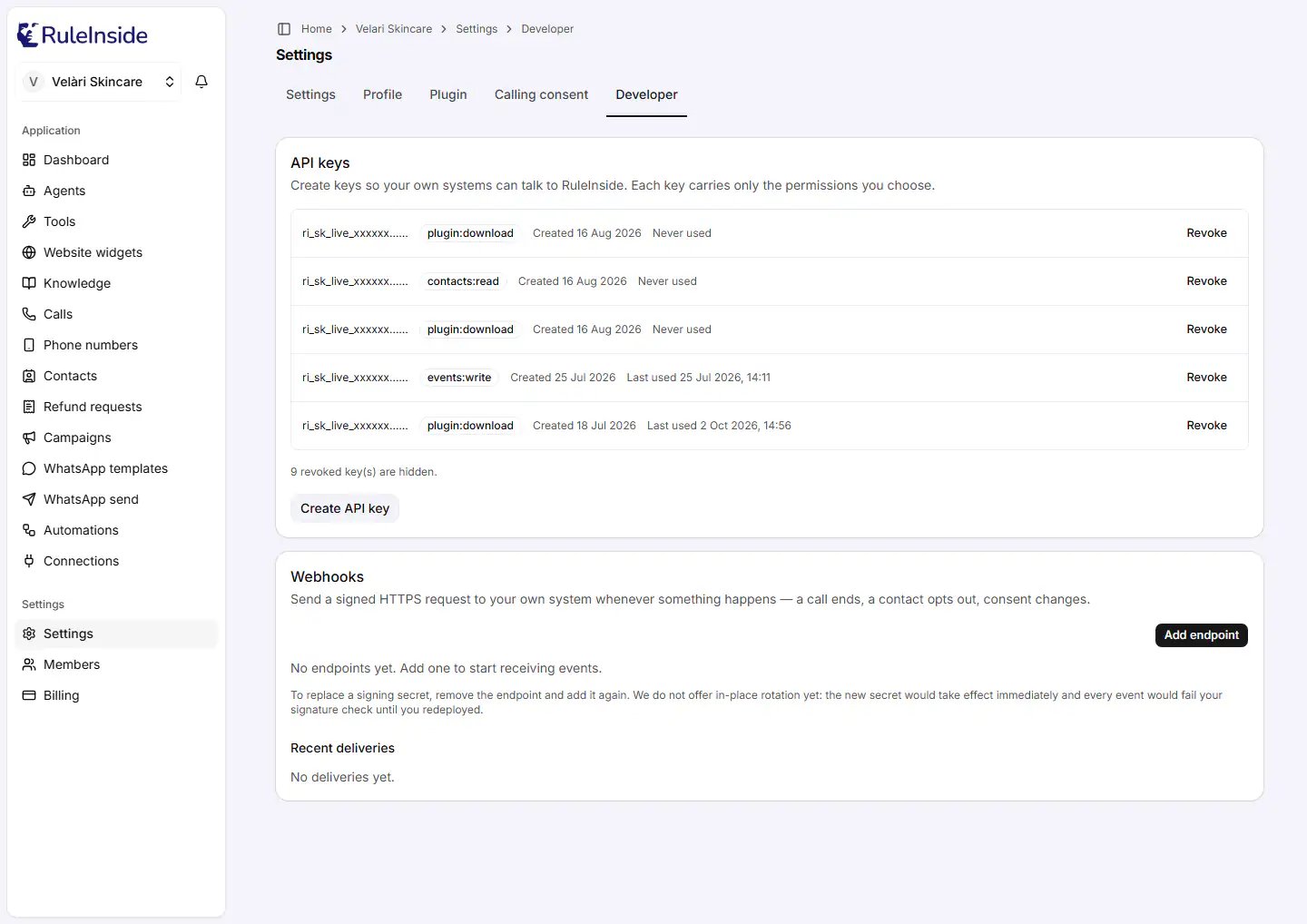
Open **Settings**, choose the **Developer** tab, and find the **API keys** card. The same tab holds
[Webhooks](/webhooks).
 ## Who can do what
* **Everyone on your team** can see the list of keys.
* **Only the owner** can create or revoke a key. Members see "Only an account owner can create or revoke API keys."
If your workspace is not linked to a store yet, API keys cannot be created.
## The list of keys
The list shows every key that has not been revoked, including the [licence keys](/plugin) of the WordPress plugin.
Each row shows:
* the start of the key followed by "…", for example `ri_sk_live_xxxxxx…` (the full key is never shown again);
* one badge for each permission the key has;
* **Created** and the date;
* **Last used** with the date and time, or **Never used**;
* **Revoke** (owner only).
Revoked keys are hidden; a line below the list says how many. With no keys you see "No API keys yet."
If you see "We could not load your API keys", the list could not be loaded at that moment. Your existing keys are
unaffected and still work. Try again shortly rather than creating a replacement.
## Create an API key
## Who can do what
* **Everyone on your team** can see the list of keys.
* **Only the owner** can create or revoke a key. Members see "Only an account owner can create or revoke API keys."
If your workspace is not linked to a store yet, API keys cannot be created.
## The list of keys
The list shows every key that has not been revoked, including the [licence keys](/plugin) of the WordPress plugin.
Each row shows:
* the start of the key followed by "…", for example `ri_sk_live_xxxxxx…` (the full key is never shown again);
* one badge for each permission the key has;
* **Created** and the date;
* **Last used** with the date and time, or **Never used**;
* **Revoke** (owner only).
Revoked keys are hidden; a line below the list says how many. With no keys you see "No API keys yet."
If you see "We could not load your API keys", the list could not be loaded at that moment. Your existing keys are
unaffected and still work. Try again shortly rather than creating a replacement.
## Create an API key
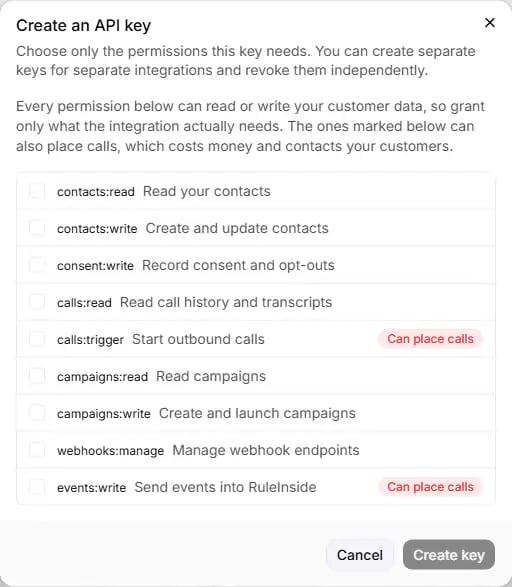 Owner only. The **Create an API key** dialog opens.
Choose only the permissions this integration needs (see the table below). **Create key** is available once at
least one is ticked.
It reads "Creating…" while the key is made. If it fails, you see "Could not create the key."
The **Copy your API key now** dialog shows the full key, starting with `ri_sk_live_`. Click **Copy** (it
changes to **Copied**), store the key safely, then click **Done**.
The key is shown only once. We store only a scrambled fingerprint of it, so nobody, including us, can show it to
you again. If you lose it, create a new key and revoke the old one.
## The permissions
Every permission can read or change your customer data, so grant only what the integration actually needs.
Permissions marked **Can place calls** can also start calls, which costs money and contacts your customers.
| Permission | Label in the portal | What it allows |
| - | - | - |
| `contacts:read` | **Read your contacts** | Read your contact records. |
| `contacts:write` | **Create and update contacts** | Create contacts and change them. |
| `consent:write` | **Record consent and opt-outs** | Record consent and opt-outs. This also creates or updates the contact. |
| `calls:read` | **Read call history and transcripts** | Read your calls, including customer details and summaries. |
| `calls:trigger` | **Start outbound calls** (**Can place calls**) | Start a call, and launch a campaign. |
| `campaigns:read` | **Read campaigns** | Read your campaigns, including their test phone numbers. |
| `campaigns:write` | **Create and launch campaigns** | Create campaigns as drafts and cancel them. Launching a campaign also needs **Start outbound calls**. |
| `webhooks:manage` | **Manage webhook endpoints** | Add and remove [webhook endpoints](/webhooks) through the API. An endpoint decides where your customer data is sent. |
| `events:write` | **Send events into RuleInside** (**Can place calls**) | Send events. An event can schedule a follow-up call if you have an [Automation](/automations) that matches it. |
The plugin download permission (`plugin:download`) is not offered here. Create it as a licence key on the
[Plugin](/plugin) tab instead.
You cannot change the permissions of an existing key. Create a new key with the permissions you want, move your
integration to it, then revoke the old key.
## Using a key
Send the key in the `Authorization` header of every request:
```http Header theme={null}
Authorization: Bearer ri_sk_live_xxxxxx
```
* Keys created here are always live keys, starting with `ri_sk_live_`.
* A key has no expiry date. It stops working when you revoke it, or while your account is not active.
* Each key can make a set number of requests a minute, depending on your plan. Above that, the API answers `429`
with a `Retry-After` time to wait before trying again.
| Plan | Requests a minute, per key |
| - | - |
| Lite | 60 |
| Starter | 120 |
| Growth | 300 |
| Scale | 600 |
| Pay-as-you-go | 120 |
## Revoke a key
Click **Revoke** on the key and confirm with **Revoke key** ("Revoke this API key?"). You see "API key revoked.",
or "That key was already revoked, or no longer exists."
Anything using the key stops working immediately, and this cannot be undone. Revoking a key with the
`plugin:download` badge also stops plugin updates for any store using it.
## Common questions
Only the ones it uses. Anything that can start calls is marked **Can place calls**: grant those only to an
integration that must place calls.
It cannot be shown again. Create a new key, switch your integration over to it, then revoke the old one.
Check whether the key was revoked (the line below the list counts revoked keys), whether your account is active,
and whether the integration is over its requests a minute (it then gets `429`).
They are licence keys for the WordPress plugin. Revoking one stops plugin updates for the store that uses it.
See [WordPress plugin](/plugin).
This documentation is built and hosted on [Mintlify](https://mintlify.com), a developer documentation platform.
Owner only. The **Create an API key** dialog opens.
Choose only the permissions this integration needs (see the table below). **Create key** is available once at
least one is ticked.
It reads "Creating…" while the key is made. If it fails, you see "Could not create the key."
The **Copy your API key now** dialog shows the full key, starting with `ri_sk_live_`. Click **Copy** (it
changes to **Copied**), store the key safely, then click **Done**.
The key is shown only once. We store only a scrambled fingerprint of it, so nobody, including us, can show it to
you again. If you lose it, create a new key and revoke the old one.
## The permissions
Every permission can read or change your customer data, so grant only what the integration actually needs.
Permissions marked **Can place calls** can also start calls, which costs money and contacts your customers.
| Permission | Label in the portal | What it allows |
| - | - | - |
| `contacts:read` | **Read your contacts** | Read your contact records. |
| `contacts:write` | **Create and update contacts** | Create contacts and change them. |
| `consent:write` | **Record consent and opt-outs** | Record consent and opt-outs. This also creates or updates the contact. |
| `calls:read` | **Read call history and transcripts** | Read your calls, including customer details and summaries. |
| `calls:trigger` | **Start outbound calls** (**Can place calls**) | Start a call, and launch a campaign. |
| `campaigns:read` | **Read campaigns** | Read your campaigns, including their test phone numbers. |
| `campaigns:write` | **Create and launch campaigns** | Create campaigns as drafts and cancel them. Launching a campaign also needs **Start outbound calls**. |
| `webhooks:manage` | **Manage webhook endpoints** | Add and remove [webhook endpoints](/webhooks) through the API. An endpoint decides where your customer data is sent. |
| `events:write` | **Send events into RuleInside** (**Can place calls**) | Send events. An event can schedule a follow-up call if you have an [Automation](/automations) that matches it. |
The plugin download permission (`plugin:download`) is not offered here. Create it as a licence key on the
[Plugin](/plugin) tab instead.
You cannot change the permissions of an existing key. Create a new key with the permissions you want, move your
integration to it, then revoke the old key.
## Using a key
Send the key in the `Authorization` header of every request:
```http Header theme={null}
Authorization: Bearer ri_sk_live_xxxxxx
```
* Keys created here are always live keys, starting with `ri_sk_live_`.
* A key has no expiry date. It stops working when you revoke it, or while your account is not active.
* Each key can make a set number of requests a minute, depending on your plan. Above that, the API answers `429`
with a `Retry-After` time to wait before trying again.
| Plan | Requests a minute, per key |
| - | - |
| Lite | 60 |
| Starter | 120 |
| Growth | 300 |
| Scale | 600 |
| Pay-as-you-go | 120 |
## Revoke a key
Click **Revoke** on the key and confirm with **Revoke key** ("Revoke this API key?"). You see "API key revoked.",
or "That key was already revoked, or no longer exists."
Anything using the key stops working immediately, and this cannot be undone. Revoking a key with the
`plugin:download` badge also stops plugin updates for any store using it.
## Common questions
Only the ones it uses. Anything that can start calls is marked **Can place calls**: grant those only to an
integration that must place calls.
It cannot be shown again. Create a new key, switch your integration over to it, then revoke the old one.
Check whether the key was revoked (the line below the list counts revoked keys), whether your account is active,
and whether the integration is over its requests a minute (it then gets `429`).
They are licence keys for the WordPress plugin. Revoking one stops plugin updates for the store that uses it.
See [WordPress plugin](/plugin).
This documentation is built and hosted on [Mintlify](https://mintlify.com), a developer documentation platform.