> ## Documentation Index
> Fetch the complete documentation index at: https://docs.ruleinside.com/llms.txt
> Use this file to discover all available pages before exploring further.
# Automations
> Rules that place calls for you when contacts match a condition, with no campaign to launch.
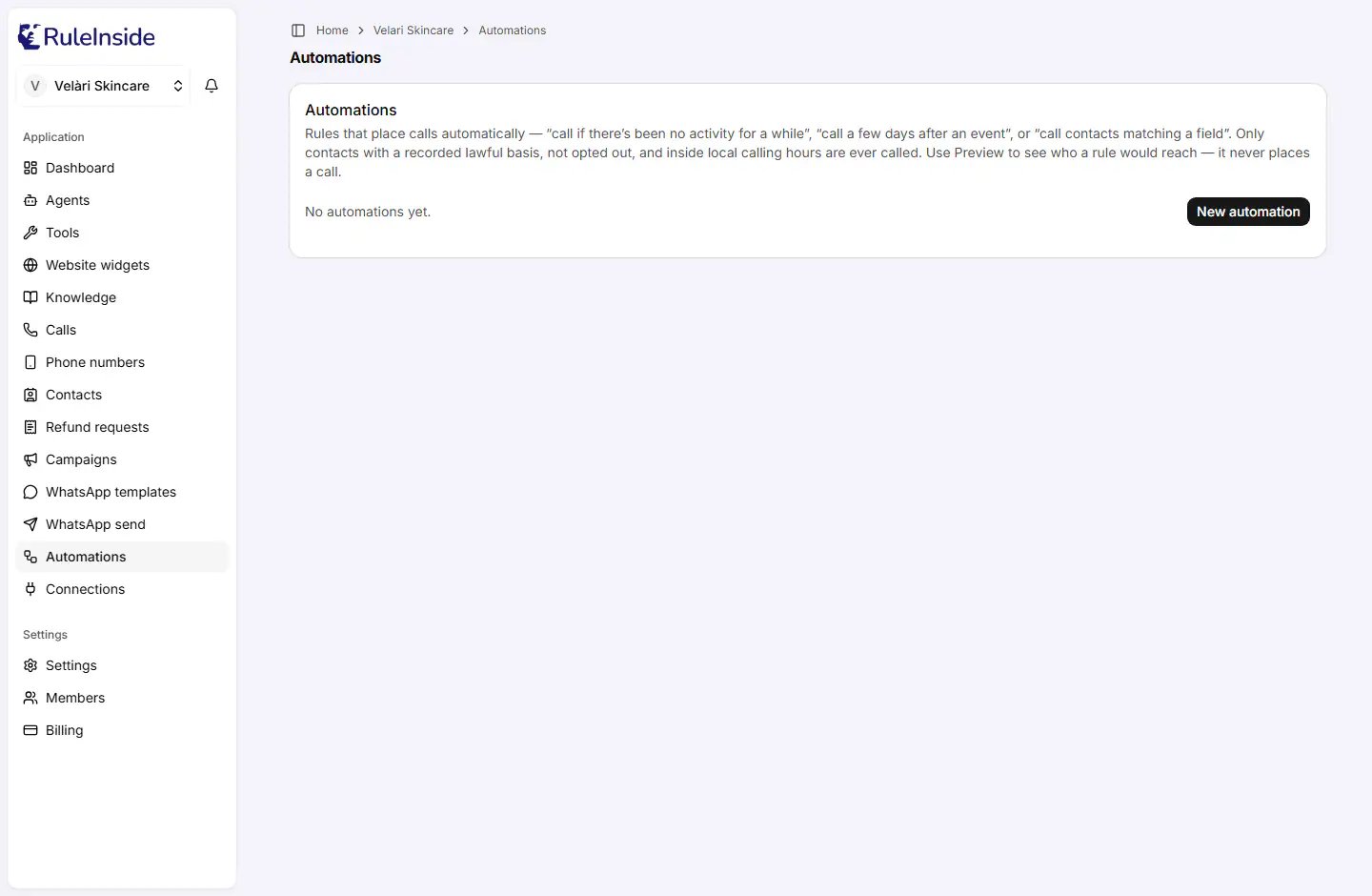
**Automations** are standing rules that place calls on their own when contacts match a condition: "call if there's
been no activity for a while", "call a few days after an event", or "call contacts matching a field". There is
nothing to launch: a rule that is switched on runs by itself.
Every call a rule places passes the same checks as any other call. Nobody is called who opted out, is on your
do-not-call list, has no recorded consent, is outside their calling hours or days, or was called too often recently,
and nobody at all is called once your daily call limit is reached or while your store has not confirmed its calling
consent. Switching a rule on never grants consent. See [How calling rules protect your customers](/outbound-rules).
 ## Who can do what
* **Any member** can see the rules and use **Preview**, which never places a call.
* **Only the account owner** can add a rule, switch it on or off, or delete it. Other members see **Only account
owners can add or change automations: ask an owner of your team.** and a read-only **Active** or **Off** badge.
## The rules on the page
The line at the top counts your rules (for example **3 automations.**, or **No automations yet.**). Each rule is a
card, newest first, with:
* its trigger: **No activity for a while**, **Follow up after an event**, **Contacts matching a field** or **Win back
past customers**;
* its status: **Active** or **Off**;
* a one-line description, for example **Call anyone with no activity for 30 days.**;
* (owner) a switch, **On** / **Off**;
* **Preview** (**Checking…** while working);
* (owner) **Delete**.
## Creating a rule
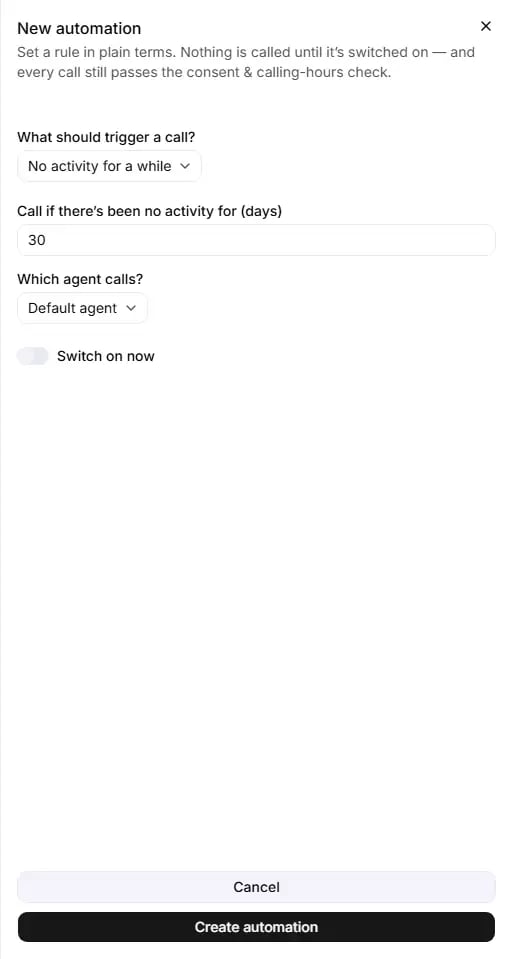
Click **New automation** (owner only). **Set a rule in plain terms. Nothing is called until it's switched on: and
every call still passes the consent & calling-hours check.**
## Who can do what
* **Any member** can see the rules and use **Preview**, which never places a call.
* **Only the account owner** can add a rule, switch it on or off, or delete it. Other members see **Only account
owners can add or change automations: ask an owner of your team.** and a read-only **Active** or **Off** badge.
## The rules on the page
The line at the top counts your rules (for example **3 automations.**, or **No automations yet.**). Each rule is a
card, newest first, with:
* its trigger: **No activity for a while**, **Follow up after an event**, **Contacts matching a field** or **Win back
past customers**;
* its status: **Active** or **Off**;
* a one-line description, for example **Call anyone with no activity for 30 days.**;
* (owner) a switch, **On** / **Off**;
* **Preview** (**Checking…** while working);
* (owner) **Delete**.
## Creating a rule
Click **New automation** (owner only). **Set a rule in plain terms. Nothing is called until it's switched on: and
every call still passes the consent & calling-hours check.**
 ### What should trigger a call?
Default: **No activity for a while**. Each trigger has its own fields:
| Trigger | Field | Default | Allowed values |
| - | - | - | - |
| **No activity for a while** | **Call if there's been no activity for (days)** | 30 | A whole number, 1 or more. |
| **Follow up after an event** | **Event type** (for example `appointment.booked` or `order.completed`) | empty | Required. Letters, digits, dots, underscores and hyphens, starting with a letter or digit, up to 64 characters. It must match the event's name exactly. |
| | **Days after the event** | 3 | 0 to 365. |
| **Contacts matching a field** | **Field** (a contact field, for example `deal_stage`) | empty | Required. A valid contact column name. |
| | **Equals** (for example `qualified`) | empty | Required, not blank. The value must match exactly. |
| **Win back past customers** | **Last ordered more than (days) ago** | 60 | A whole number, 1 or more. |
What each trigger looks at:
* **No activity for a while** uses the last time an event about the contact arrived. Only contacts that were once
active and then went quiet qualify.
* **Win back past customers** uses the date of the contact's last order in your store. Only contacts with a recorded
store order qualify. You can have only one win-back rule switched on at a time.
* **Contacts matching a field** uses the contact's own columns (see [Contacts](/contacts)).
* **Follow up after an event** calls a contact the chosen number of days after an event of that exact type arrives
for them (see [How rules run](#how-rules-run)).
### Which agent calls?
**Default agent** (your default agent at the moment of each call), or one of your agents by name. Choosing the agent
marked **(default)** by name keeps that agent even if you change your default later. The call always comes from the
number assigned to that agent; there is no number to choose.
### Switch on now
**Switch on now** is off by default: the rule is created switched off, and you switch it on from its card when you
are ready.
### Saving
* **Cancel** closes the form. Nothing is saved.
* **Create automation** (**Creating…** while working) saves the rule. If a required value is missing you see **Fill
in the rule details first.**; on success, **Automation created.**
Each run of a rule calls at most 2,000 people, and uses the default retry settings for unanswered calls (up to 3
attempts, at least 3 hours apart, at most 2 a day). These cannot be changed in the portal.
## Preview
**Preview** shows who a rule would reach right now. It never places a call, and any member can use it.
* For **No activity for a while**, **Contacts matching a field** and **Win back past customers**: **\{matched}
contact(s) match right now · \{callable} callable after the compliance check. (Preview places no calls.)**, then
**Excluded:** with each reason and its count. If the group was cut at the rule's limit: **Showing a capped sample:
the real group may be larger.**
* For **Follow up after an event**: **This runs when an "\{eventType}" event arrives: it then calls that contact
\{days} day(s) later (if they're reachable). No one is called right now.**
Preview runs every check as of now, including calling hours, so the callable number can change with the time of day.
The reasons after **Excluded:** are short codes:
| Shown | Meaning | What to do |
| - | - | - |
| no store attestation | Your store has not confirmed its calling consent. | The owner confirms it under **Settings › Calling consent**. |
| opt out | The person opted out. | Nothing. |
| dnc | The number is on your do-not-call list. | Nothing. |
| no consent | No recorded lawful basis to call. | Record consent in [Contacts](/contacts). |
| outside window | Outside their calling hours or days now. | Nothing: it changes with the clock. |
| no timezone | Their time zone could not be worked out. | Store a time zone, or set a default under **Settings › Calling consent**. |
| frequency cap | Called too often in the last 7 days. | Nothing: it clears within a week. |
| daily cap | Your daily call limit is reached. | Nothing: it clears within 24 hours. |
| error | A check could not be completed. | Try again shortly. |
## Switching a rule on or off
The owner's **On** / **Off** switch saves at once, with no confirmation. If the save fails, the switch flips back and
you see **Could not update the automation.** Switching a rule off stops its future runs; it does not recall calls
already placed.
## Deleting a rule
**Delete** asks **Delete this automation?** "It will stop running. This can't be undone." Press **Delete** to confirm,
or **Keep it** to go back. Calls already placed are not recalled.
A rule cannot be edited. To change one, create a new rule with the settings you want, then delete the old one.
## How rules run
* **No activity for a while**, **Contacts matching a field** and **Win back past customers** run twice a month: at
04:00 UTC on the 1st and on the 15th. A rule you switch on in between waits for the next run.
* **Only one of these rules runs for your store each time: the oldest one that is switched on.** A newer rule
switched on at the same time does nothing while the older one is on. Keep one of these rules on at a time, and
switch the others off.
* A run is skipped when your previous automatic batch is still running, or when the rule's agent has no outbound
number assigned. Assign one on [Phone numbers](/phone-numbers).
* Rules use your **account's** calling hours and days (under **Settings › Calling consent**). A rule has no hours of its
own.
* **Follow up after an event** does not wait for those dates. When an event of that exact type arrives for a
contact, through a [Connection](/connections) or the developer API, one call is planned for the event's time plus
the days you chose, and placed after every check runs. An event whose call would already be more than 2 days late
(for example an old event sent late) is ignored.
* Orders from your store count as events only when store activity events are switched on for your account by our
team (they are off by default). Otherwise an `order.completed` rule only fires for events sent through a
Connection or the developer API.
* An event follow-up created in the portal is always a phone call.
## Common questions
Scheduled rules run only at 04:00 UTC on the 1st and 15th of each month. Also check that it is the oldest rule
switched on (only that one runs), that your previous automatic batch has finished, and that the rule's agent has
an outbound number assigned.
The **Event type** must match the event's name exactly, for example `order.completed`, and events must actually
arrive: through a Connection or the developer API, or from your store's orders only if store activity events are
switched on for your account. An event more than 2 days past its due time is ignored.
Read **Excluded:**. "no store attestation" is fixed under **Settings › Calling consent**, "no consent" in
[Contacts](/contacts), "frequency cap" clears by itself within a week, "outside window" changes with the time of
day, and "error" means try again.
No. Create a new rule with the settings you want, then delete the old one.
Only one win-back rule can be switched on at a time. Switch the other off, or delete it, before switching a new
one on.
No. Rules always use your account's calling hours and days, in each person's own time zone. To call at other
times, use a [campaign](/campaigns) with its own calling hours.
**No activity for a while** looks at the last event about the contact. **Win back past customers** looks at the
date of their last order in your store. They can select different people.
At most 2,000 per run, and only those who pass every check at that moment.
This documentation is built and hosted on [Mintlify](https://mintlify.com), a developer documentation platform.
### What should trigger a call?
Default: **No activity for a while**. Each trigger has its own fields:
| Trigger | Field | Default | Allowed values |
| - | - | - | - |
| **No activity for a while** | **Call if there's been no activity for (days)** | 30 | A whole number, 1 or more. |
| **Follow up after an event** | **Event type** (for example `appointment.booked` or `order.completed`) | empty | Required. Letters, digits, dots, underscores and hyphens, starting with a letter or digit, up to 64 characters. It must match the event's name exactly. |
| | **Days after the event** | 3 | 0 to 365. |
| **Contacts matching a field** | **Field** (a contact field, for example `deal_stage`) | empty | Required. A valid contact column name. |
| | **Equals** (for example `qualified`) | empty | Required, not blank. The value must match exactly. |
| **Win back past customers** | **Last ordered more than (days) ago** | 60 | A whole number, 1 or more. |
What each trigger looks at:
* **No activity for a while** uses the last time an event about the contact arrived. Only contacts that were once
active and then went quiet qualify.
* **Win back past customers** uses the date of the contact's last order in your store. Only contacts with a recorded
store order qualify. You can have only one win-back rule switched on at a time.
* **Contacts matching a field** uses the contact's own columns (see [Contacts](/contacts)).
* **Follow up after an event** calls a contact the chosen number of days after an event of that exact type arrives
for them (see [How rules run](#how-rules-run)).
### Which agent calls?
**Default agent** (your default agent at the moment of each call), or one of your agents by name. Choosing the agent
marked **(default)** by name keeps that agent even if you change your default later. The call always comes from the
number assigned to that agent; there is no number to choose.
### Switch on now
**Switch on now** is off by default: the rule is created switched off, and you switch it on from its card when you
are ready.
### Saving
* **Cancel** closes the form. Nothing is saved.
* **Create automation** (**Creating…** while working) saves the rule. If a required value is missing you see **Fill
in the rule details first.**; on success, **Automation created.**
Each run of a rule calls at most 2,000 people, and uses the default retry settings for unanswered calls (up to 3
attempts, at least 3 hours apart, at most 2 a day). These cannot be changed in the portal.
## Preview
**Preview** shows who a rule would reach right now. It never places a call, and any member can use it.
* For **No activity for a while**, **Contacts matching a field** and **Win back past customers**: **\{matched}
contact(s) match right now · \{callable} callable after the compliance check. (Preview places no calls.)**, then
**Excluded:** with each reason and its count. If the group was cut at the rule's limit: **Showing a capped sample:
the real group may be larger.**
* For **Follow up after an event**: **This runs when an "\{eventType}" event arrives: it then calls that contact
\{days} day(s) later (if they're reachable). No one is called right now.**
Preview runs every check as of now, including calling hours, so the callable number can change with the time of day.
The reasons after **Excluded:** are short codes:
| Shown | Meaning | What to do |
| - | - | - |
| no store attestation | Your store has not confirmed its calling consent. | The owner confirms it under **Settings › Calling consent**. |
| opt out | The person opted out. | Nothing. |
| dnc | The number is on your do-not-call list. | Nothing. |
| no consent | No recorded lawful basis to call. | Record consent in [Contacts](/contacts). |
| outside window | Outside their calling hours or days now. | Nothing: it changes with the clock. |
| no timezone | Their time zone could not be worked out. | Store a time zone, or set a default under **Settings › Calling consent**. |
| frequency cap | Called too often in the last 7 days. | Nothing: it clears within a week. |
| daily cap | Your daily call limit is reached. | Nothing: it clears within 24 hours. |
| error | A check could not be completed. | Try again shortly. |
## Switching a rule on or off
The owner's **On** / **Off** switch saves at once, with no confirmation. If the save fails, the switch flips back and
you see **Could not update the automation.** Switching a rule off stops its future runs; it does not recall calls
already placed.
## Deleting a rule
**Delete** asks **Delete this automation?** "It will stop running. This can't be undone." Press **Delete** to confirm,
or **Keep it** to go back. Calls already placed are not recalled.
A rule cannot be edited. To change one, create a new rule with the settings you want, then delete the old one.
## How rules run
* **No activity for a while**, **Contacts matching a field** and **Win back past customers** run twice a month: at
04:00 UTC on the 1st and on the 15th. A rule you switch on in between waits for the next run.
* **Only one of these rules runs for your store each time: the oldest one that is switched on.** A newer rule
switched on at the same time does nothing while the older one is on. Keep one of these rules on at a time, and
switch the others off.
* A run is skipped when your previous automatic batch is still running, or when the rule's agent has no outbound
number assigned. Assign one on [Phone numbers](/phone-numbers).
* Rules use your **account's** calling hours and days (under **Settings › Calling consent**). A rule has no hours of its
own.
* **Follow up after an event** does not wait for those dates. When an event of that exact type arrives for a
contact, through a [Connection](/connections) or the developer API, one call is planned for the event's time plus
the days you chose, and placed after every check runs. An event whose call would already be more than 2 days late
(for example an old event sent late) is ignored.
* Orders from your store count as events only when store activity events are switched on for your account by our
team (they are off by default). Otherwise an `order.completed` rule only fires for events sent through a
Connection or the developer API.
* An event follow-up created in the portal is always a phone call.
## Common questions
Scheduled rules run only at 04:00 UTC on the 1st and 15th of each month. Also check that it is the oldest rule
switched on (only that one runs), that your previous automatic batch has finished, and that the rule's agent has
an outbound number assigned.
The **Event type** must match the event's name exactly, for example `order.completed`, and events must actually
arrive: through a Connection or the developer API, or from your store's orders only if store activity events are
switched on for your account. An event more than 2 days past its due time is ignored.
Read **Excluded:**. "no store attestation" is fixed under **Settings › Calling consent**, "no consent" in
[Contacts](/contacts), "frequency cap" clears by itself within a week, "outside window" changes with the time of
day, and "error" means try again.
No. Create a new rule with the settings you want, then delete the old one.
Only one win-back rule can be switched on at a time. Switch the other off, or delete it, before switching a new
one on.
No. Rules always use your account's calling hours and days, in each person's own time zone. To call at other
times, use a [campaign](/campaigns) with its own calling hours.
**No activity for a while** looks at the last event about the contact. **Win back past customers** looks at the
date of their last order in your store. They can select different people.
At most 2,000 per run, and only those who pass every check at that moment.
This documentation is built and hosted on [Mintlify](https://mintlify.com), a developer documentation platform.