> ## Documentation Index
> Fetch the complete documentation index at: https://docs.ruleinside.com/llms.txt
> Use this file to discover all available pages before exploring further.
# The campaign page and its results
> Test, launch, pause, resume and cancel a campaign, and read, filter and download every call it placed.
Open a campaign from **Campaigns** (click its name or **View**) to see everything about it: its settings, the
buttons that test, launch, pause, resume and cancel it, the batches of calls it placed and, for a phone campaign,
every call with its result. The page always shows the campaign's current status when you open it.
* **Any member** can read the page, filter the calls, choose columns and use **Download Excel**.
* **Only the account owner** can use **Edit**, **Send test call**, **Launch campaign**, **Pause**, **Resume**,
**Pause again** and **Cancel**. Other members see these greyed out with **Only account owners can manage this: ask
an owner of your team.**
To create a campaign, see [Campaigns](/campaigns).
## The summary
At the top: the campaign name, its status and **← All campaigns**. The summary box shows what the campaign will use.
Fields marked (phone) are not shown for a WhatsApp campaign.
| Field | What it shows |
| - | - |
| **Channel** | **Phone call** or **WhatsApp message**. |
| **Agent** | The agent's name, or "Default agent": your default agent at the time of each call. |
| **Calls from** (phone) | The number, or "Assigned to the agent": the number assigned to that agent is used. |
| **Audience** | **All contacts**, **Dormant > \{days} days**, or **\{count} selected contacts**. |
| **Schedule** (phone) | The start time you set, or **On launch**. |
| **Concurrent calls** (phone) | The saved number, or **Auto** (your plan's maximum). |
| **Ring timeout** (phone) | For example "30s", or **Default**. |
| **Retries** (phone) | For example "up to 3, every 3h (max 2/day)". These are the values actually saved, after any lowering. |
| **Waiting for their calling time** (phone) | Shown only when people are waiting: how many, and **First:** with the earliest time. Each is checked again about an hour before the call. |
| **Calling hours and days** (phone) | **The account calling hours and days**, or the campaign's own, for example "09:00 to 18:00, Mon, Tue, Wed". |
| **Default country code** | The code, or a dash. |
| **Test numbers** (phone) | Your test numbers, or a dash. |
| **Created** | When the campaign was created. |
## The buttons
Which buttons you see depends on the campaign's status. While one action is running, all the buttons are disabled.
| Button | Shown when | What it does | Confirmation |
| - | - | - | - |
| **Edit** | Draft | Opens **Edit campaign**. See [Editing a draft](/campaigns#editing-a-draft). | None |
| **Send test call** | Draft phone campaign with at least one test number | Calls only your test numbers. The campaign stays a draft. | **Place a test call?** then **Place test call** |
| **Launch campaign** | Draft | Starts the campaign for real. | **Launch this campaign?** (phone) or **Send this WhatsApp campaign?** then **Launch now** |
| **Pause** | Running or Scheduled phone campaign | No new call starts. Everyone not yet called keeps their place; retries wait. | **Pause this campaign?** then **Pause campaign** |
| **Resume** | Paused phone campaign | Calling continues inside each person's calling hours and days. | **Resume this campaign?** then **Resume campaign** |
| **Pause again** | Paused phone campaign | Checks every batch again and stops any that is still calling. Safe to press more than once. | None: it runs at once |
| **Cancel** | Draft, Scheduled, Running or Paused, and whenever a batch may still be calling | Ends the campaign for good. | **Cancel this campaign?** then **Cancel campaign** |
In each confirmation, the other button (**Cancel**, **Keep running**, **Stay paused** or **Keep campaign**) closes it
without doing anything.
**What cannot be undone**
* **Launch:** calls already placed and WhatsApp messages already sent cannot be recalled. A launched campaign can
never be launched again or edited.
* **Cancel:** the status becomes **Cancelled** for good. There is no way to restart it. Scheduled batches,
retries and booked call-backs are cancelled with it. Calls already under way cannot be recalled.
* **Pause again** has no confirmation step; it only stops calling, so it is safe to press.
### Send test call
The confirmation reads: "This calls your configured test number(s): \{numbers}: so you can hear the agent before
launching live. It places a real call (standard charges apply) but does not touch your contact list."
A test call is checked against your store's calling consent confirmation, your do-not-call list and opt-outs, this
campaign's calling hours and days, and your daily call limit. It is **not** checked for consent, because a test
number is not one of your contacts: only use your own phones. A test call counts towards your daily call limit.
You then see **Test call placed to \{count} number(s).** or **No test call was placed.** with the reason, for example
that a number is not in international format, is on the do-not-call or opt-out list, is outside the calling hours,
that the daily limit is reached, or that your store has not confirmed its calling consent.
Test calls are for phone campaigns only. To test a WhatsApp template, send it to one number from the
[WhatsApp](/whatsapp) send page.
### Launch campaign
For a phone campaign the confirmation reads: "This places real phone calls to your eligible contacts and will incur
calling charges. We automatically skip anyone who is opted out, on a do-not-call list, without a lawful basis, or
outside their local calling hours. This can't be undone once calls start (you can cancel to stop remaining calls)."
For a WhatsApp campaign: "This sends real WhatsApp messages (your approved re-engagement template) to your eligible
contacts and will incur messaging charges. We automatically skip anyone who is opted out of WhatsApp, on a
do-not-contact list, or without WhatsApp consent. Messages start sending immediately and can't be recalled once
sent."
Each person is called in their own time zone, so the contacts are grouped by time zone, and each group starts at its
next allowed time (never before the schedule you set). A group whose time is more than an hour away waits, and is
checked again, opt-outs included, about an hour before its calls.
A launch can be refused, for example when your account is not active, when the agent has no outbound number, when
the chosen number is no longer available, or, for WhatsApp, when no re-engagement template is enabled. The message
tells you which.
### Pause and Resume
Pause and Resume are for phone campaigns only.
* **Pause:** "No new calls will start. Calls already under way cannot be recalled. Everyone not yet called keeps
their place, and retries wait until you resume." The page then shows **This campaign is paused. No new calls start.
Everyone not yet called keeps their place, and Resume carries on inside each person's calling hours and days.**
* If you see **Campaign paused, but \{count} batch(es) could not be confirmed stopped and may still be calling. Press
Pause again.**, press **Pause again**. If the message repeats, contact support.
* **Resume:** "Calling continues inside each person's calling hours and days. Everyone is checked again for
opt-outs, do-not-call and consent before they are called. Retries that came due while paused go out within about
an hour." Pressing **Resume** does not place a call by itself.
Your account must be active to launch or resume. Pausing and cancelling work even when it is not, so you can always
stop calls.
### Cancel
The confirmation reads: "Any calls already placed can't be recalled, but we'll stop scheduled and in-progress batches
and any retries, so no further contacts are dialed."
If the message says some batches **could not be confirmed** stopped, press **Cancel** again: the button stays
available while any batch may still be calling. If the message repeats, contact support.
## The launch result
Right after a launch or a test call, a box under the summary tells you what happened. It is shown only until you
reload the page.
* **Campaign launched** with, for example, **Dialing \{count} contact(s).** or **\{held} contact(s) are waiting for
their calling time: each is checked again, including opt-outs, about an hour before the call.**
* **Launch complete: nobody was dialed** (phone) or **Send complete: nobody was messaged** (WhatsApp), with **We
matched \{count} contact(s), but none could be called right now.**
* One line per reason people were left out, for example **\{count} skipped: opted out**, **\{count} skipped: phone not
in international format** or **\{count} will be tried again by this campaign when they can next be called**.
| Reason (phone) | Reason (WhatsApp) | What to do |
| - | - | - |
| **opted out** | **opted out** | Nothing: they asked not to be contacted. |
| **on the do-not-call list** | **on the do-not-contact list** | Nothing, while they stay on the list. |
| **no recorded lawful basis to call** | **no recorded consent to message on WhatsApp** | Record their consent in [Contacts](/contacts), or upload the list with a basis. |
| **outside local calling hours** | **outside messaging hours** | Try later, when their calling hours are open. |
| **no timezone on file** | **no timezone on file** | Store a time zone on the contact, or set a default time zone under **Settings › Calling consent**. |
| **called too recently** | **messaged too recently** | Wait: it clears within 7 days. |
| **daily call cap reached** | **daily message cap reached** | Wait: it clears within 24 hours. |
| **a processing error** | **a processing error** | Try again shortly. |
| **your store has not confirmed its calling consent (Settings › Calling consent)** | **your store has not confirmed its messaging consent (Settings › Calling consent)** | The owner confirms it under **Settings › Calling consent**. |
| Not used for calls | **they told WhatsApp to stop marketing messages from your store** | Nothing: only they can turn your marketing messages back on, in WhatsApp. |
People left out at launch because the daily call cap was reached, or because of a processing error, are tried
again by the same campaign, up to one day of your daily call cap per launch, starting an hour later or when their
calling hours next open, for up to about a day, with every check run again. The launch result shows them as
**will be tried again by this campaign when they can next be called**, and anyone beyond one day of your cap, already
being called by another campaign, or whose calling hours are too short for a retry, as **not called by this campaign**. People left out for any other reason, including **called too
recently**, are not called later by that campaign: to reach them, create a new campaign once the reason has passed.
**If nobody was called and nobody is waiting**, the campaign stays a **Draft**: fix the reason and launch it again.
Once at least one person was called or is waiting, it becomes **Running** or **Scheduled** and can never be launched
again. A WhatsApp launch where some messages could not be queued also stays a draft; launching it again reaches the
rest, and nobody receives the message twice. A WhatsApp draft that has already queued messages for some contacts can
be launched again but not edited, even if those messages later failed or were suppressed. Trying to edit it shows
"This WhatsApp campaign has already queued messages for some contacts. It can be launched again to reach the rest,
but not edited."
## Campaign statuses
| Status | What it means | What you can do |
| - | - | - |
| **Draft** | Saved; nobody called yet, or a launch found nobody to call. | Edit, Send test call (phone), Launch, Cancel |
| **Scheduled** | Launched; at least one group is set for a later time. | Pause (phone), Cancel |
| **Running** | Launched and calling (or messaging). | Pause (phone), Cancel |
| **Paused** | Phone only. No new call starts; everyone waiting keeps their place. | Resume, Pause again, Cancel |
| **Completed** | Nothing is left to do. Set automatically. | Nothing |
| **Cancelled** | Stopped for good. | Nothing |
* A phone campaign stays **Running** while it still owes retries or booked call-backs, even after every first call
is done. It also stays open for up to 20 minutes after a batch ends, while a call may still be under way.
* **A WhatsApp campaign keeps showing Running after launch.** Its messages are all queued at launch, but the status
does not change to **Completed** on its own. To see what happened to each message, use the send log on
[WhatsApp](/whatsapp).
## Call batches
A phone campaign hands its calls to the voice provider in batches, one or more per time zone. **Call batches** lists
them, newest first. Before launch: **No batches yet. Batches appear here once the campaign is launched.**
| Column | What it shows |
| - | - |
| **Created** | When the batch was created. |
| **Type** | **First call** (from the launch) or **Call-back** (a later batch placed for this campaign). |
| **Timezone** | The time zone or zones of the batch. |
| **Status** | **Pending**, **In progress**, **Completed**, **Failed**, **Cancelled** or **Cancel failed**. |
| **Scheduled for** | When the batch was set to start, or **Immediate**. |
| **Calls** | How many calls were recorded for the batch. |
| **Results** | Each result with its count, for example "Spoke with the customer 1 · No answer 3". Batches from before 24 September 2026 read **Results are recorded from 24 September 2026**. |
**Cancel failed** (in red) means we asked to stop the batch and could not confirm it stopped: it may still be
calling. Press **Cancel** again.
For a WhatsApp campaign, the table shows **Created**, **Timezone**, **Status**, **Scheduled for** and **Dialed /
Done**, which reads **\{count} message(s) enqueued**.
## WhatsApp after the call
Shown when the campaign has at least one WhatsApp follow-up switched on. **After we spoke** and **We couldn't reach
you** each read **Off**, or:
* **\{count} sent**
* **\{count} waiting** (queued, or held until the calling hours open)
* **\{count} not sent: no WhatsApp permission**
* **\{count} not sent: other reason** (for example an opt-out, the do-not-contact list, the weekly limit, or a
stopped campaign)
* **\{count} failed**
## Calls
For a phone campaign, **Calls** lists every call it placed, one row per call, newest first, 50 per page, with the
number of calls recorded next to the heading.
### Searching and result chips
* **Search a name or phone number**, then **Search**: finds a contact name containing your text (any letter case),
or a number containing the same digits (at least 3).
* Under the toolbar, each result that happened appears as a chip with its count, for example **Spoke with the
customer: 2**. Click a chip to show only those calls; click it again to show them all. You can turn on several
chips; a call matching any of them is shown.
* Extra chips when they apply: **Call-backs requested: \{n}**, **Called us back: \{n}** and **Appointment booked:
\{n}** (only when your agent collects a yes/no field named `appointment_booked`).
* While a filter is on, a line shows each filter (click its × to remove it), **\{count} of \{total} calls match**, and
**Clear filters**.
The page number and the filter are kept in the address bar, so you can reload, bookmark or share a filtered view with
another member of your account.
### Columns of the calls table
| Column | What it shows |
| - | - |
| **When** | Date and time of the call, in your time zone. |
| **Contact** | The contact's name, or a dash. |
| (contact columns) | Any columns you picked in **Columns**. Hover a long value to read all of it. |
| **Phone** | The number called. |
| **Attempt** | 1 for the first call, 2 and 3 for retries. **Requested call-back** (blue) marks the call-back the customer asked for. |
| **Result** | What happened (see below). **Called us back from this number** (green) with a time means a call came in from that number after this call. |
| **Length** | Minutes and seconds, for example 0:41, or a dash. |
| (call data columns) | Any items you picked in **Call data**. Hover a value to read the agent's reason. |
| **Call log** | **Open call** opens the call's page with its transcript and recording. A dash when there is nothing to hear. |
| **Call-back requested by customer** | A dash, or the call-back's state and **Agreed time (your time zone):** with the date and time. |
**Not shown here: calls placed before this list started on 24 September 2026, calls older than 12 months, and calls
to people whose personal data has been erased. Rarely, a call we could not record is also missing.**
Use **Previous** and **Next** to move between pages.
### Call results
| Result | Meaning |
| - | - |
| Spoke with the customer | The customer was reached: they spoke, or the call lasted 15 seconds or more with the agent speaking. |
| Handed to a person | The call was handed over to a person. |
| Customer hung up straight away | Answered and ended at once. |
| No answer | It rang and nobody answered. |
| Line busy | The line was busy. |
| Voicemail | An answering machine picked up. It counts as not reached, and is retried. |
| Wrong number | The number is wrong or invalid. |
| We were not allowed to call | The call was blocked. |
| Problem on our side | A fault on our side or the voice provider's. |
| Cancelled before we called | Called off before the phone rang, for example by a pause or a cancel. |
| Unknown | The voice provider gave no usable result. RuleInside shows Unknown rather than guess. |
| Waiting for the result | The result has not arrived yet. |
### Call-back states
A customer can ask for a call-back during a call when your agent has the call-back booking tool, which our team sets
up. The **Call-back requested by customer** column shows:
| State | Meaning |
| - | - |
| **Booked, not called yet** | Agreed, waiting for its time. |
| **Placing the call** | Being dialled now. |
| **Call placed, waiting for the result** | Dialled; result not in yet. |
| **Called back, answered** | Done. |
| **Called back, no answer**, **line busy**, **went to voicemail**, **the customer hung up straight away** or **wrong number** | Dialled, not reached. An unanswered call-back is not tried again. |
| **Call placed, result unknown** | Dialled; no usable result. |
| **Problem on our side: the person may have been called** | We could not confirm whether the call went out. |
| **Not called** (with a reason) | It was not placed, for example **the person called us first** or **outside the calling hours**. |
| **Cancelled** (with a reason) | It was cancelled, for example **the campaign was cancelled**. |
A booked call-back passes the same checks as every other call when its time comes. If a check fails, it is not
placed and is not tried again.
## Add filter
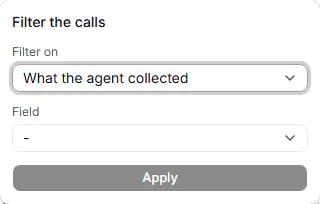 **Add filter** opens **Filter the calls**. Choose **Filter on**, then **Field**, **Condition** and **Value** as
needed, and press **Apply** (grey until the filter is complete).
| Filter on | Field | Condition and value |
| - | - | - |
| **What the agent collected** | A detail your agent collects, with how many calls have it. | Yes/no: **is yes**, **is no**, **has no value**. Number: **has a value**, **has no value**. Text: **is**, **contains**, **has a value**, **has no value**. |
| **The agent's checks** | A check your agent runs on each call. | **passed**, **failed**, **unknown** |
| **What the agent did** | A tool your agent used. | **used**, **worked**, **failed**, **had an error**, **did not run**, **was blocked** |
| **How the call ended** | (none) | One of the end reasons found on this campaign's calls |
| **Contact column** | One of your contact columns. | **is** or **contains**, then a value |
| **Attempt** | (none) | **First call**, **Retry** or **Requested call-back** |
| **Follow-ups** | (none) | **Called us back** or **Asked for a call-back** |
* Only the kinds this campaign has data for are offered; **Attempt** and **Follow-ups** are always there.
* Every filter must match at once. **is** ignores letter case; **contains** finds the text anywhere.
* Only one **Attempt** and one **Follow-ups** filter at a time: a new one replaces the old one.
* Up to 10 conditions of each kind, values up to 200 characters.
* If you see **This filter could not be used. Clear it to see the calls.**, press **Clear filters**.
## Call data
**Add filter** opens **Filter the calls**. Choose **Filter on**, then **Field**, **Condition** and **Value** as
needed, and press **Apply** (grey until the filter is complete).
| Filter on | Field | Condition and value |
| - | - | - |
| **What the agent collected** | A detail your agent collects, with how many calls have it. | Yes/no: **is yes**, **is no**, **has no value**. Number: **has a value**, **has no value**. Text: **is**, **contains**, **has a value**, **has no value**. |
| **The agent's checks** | A check your agent runs on each call. | **passed**, **failed**, **unknown** |
| **What the agent did** | A tool your agent used. | **used**, **worked**, **failed**, **had an error**, **did not run**, **was blocked** |
| **How the call ended** | (none) | One of the end reasons found on this campaign's calls |
| **Contact column** | One of your contact columns. | **is** or **contains**, then a value |
| **Attempt** | (none) | **First call**, **Retry** or **Requested call-back** |
| **Follow-ups** | (none) | **Called us back** or **Asked for a call-back** |
* Only the kinds this campaign has data for are offered; **Attempt** and **Follow-ups** are always there.
* Every filter must match at once. **is** ignores letter case; **contains** finds the text anywhere.
* Only one **Attempt** and one **Follow-ups** filter at a time: a new one replaces the old one.
* Up to 10 conditions of each kind, values up to 200 characters.
* If you see **This filter could not be used. Clear it to see the calls.**, press **Clear filters**.
## Call data
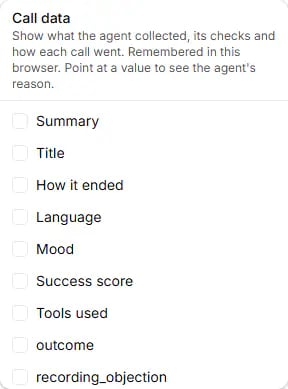 **Call data** opens a checklist: **Show what the agent collected, its checks and how each call went. Remembered in
this browser. Point at a value to see the agent's reason.** Each ticked item becomes a column.
| Item | What the column shows |
| - | - |
| **Summary** | The call's written summary. |
| **Title** | The call's short title. |
| **How it ended** | The end reason reported by the voice provider. |
| **Language** | The main language, for example "Italian". |
| **Mood** | **Positive**, **Neutral** or **Negative**. |
| **Success score** | The call's success score. |
| **Tools used** | Each tool and its result: **worked**, **failed**, **error**, **did not run**, **blocked**. |
| Each detail your agent collects | **Yes** / **No**, a number or text. Hover for the agent's reason. |
| Each check your agent runs | **Passed**, **Failed** or **Unknown**, with the score when there is one, for example "Passed (8/10)". |
The details and checks offered depend on how your agent is set up, and use your agent's own names. A call without
that piece of information shows a dash.
Your choice is saved in this browser only. A colleague, or you on another browser, starts with nothing ticked.
## Columns
**Call data** opens a checklist: **Show what the agent collected, its checks and how each call went. Remembered in
this browser. Point at a value to see the agent's reason.** Each ticked item becomes a column.
| Item | What the column shows |
| - | - |
| **Summary** | The call's written summary. |
| **Title** | The call's short title. |
| **How it ended** | The end reason reported by the voice provider. |
| **Language** | The main language, for example "Italian". |
| **Mood** | **Positive**, **Neutral** or **Negative**. |
| **Success score** | The call's success score. |
| **Tools used** | Each tool and its result: **worked**, **failed**, **error**, **did not run**, **blocked**. |
| Each detail your agent collects | **Yes** / **No**, a number or text. Hover for the agent's reason. |
| Each check your agent runs | **Passed**, **Failed** or **Unknown**, with the score when there is one, for example "Passed (8/10)". |
The details and checks offered depend on how your agent is set up, and use your agent's own names. A call without
that piece of information shows a dash.
Your choice is saved in this browser only. A colleague, or you on another browser, starts with nothing ticked.
## Columns
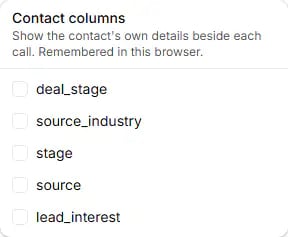 **Columns** (shown when your store has contact columns) opens **Contact columns**: **Show the contact's own details
beside each call. Remembered in this browser.** Each column you tick appears between **Contact** and **Phone**. Like
Call data, the choice is saved in this browser only.
## Download Excel
**Download Excel** (**Preparing the file...** while working) downloads the calls as an Excel file. Any member can
use it.
* It holds what the table currently shows: the active filter, or the whole campaign with no filter. All matching
calls are included, whatever page you are on, newest first, up to **5,000**. If more matched, you see **The file
holds the newest \{count} of \{total} matching calls. Narrow the filter to download the rest.**
* The file is named after the campaign and the date, with one sheet named **Calls**. Times use the time zone of the
browser that downloaded it.
* Columns, in order: **When**, **Contact**, each of your contact columns, **Phone**, **Attempt**, **Was a requested
call-back**, **Result**, **Length**, **Called us back at**, **Call-back requested by customer**, **Call-back agreed
time**, **Summary**, **Title**, **How it ended**, **Language**, **Mood**, **Success score**, then each collected
detail (with its reason), each check (with its score and reason), and **Tools used**.
* If the download fails, you see **The download failed. Please try again. (Nothing was changed.)** and no file is
saved.
## Retries
When a call is not answered, the campaign calls the person again on its own, within the retry settings saved on the
campaign (see **Retries** in the summary).
* A call that connected ends that person's calls: no retry. The exception is a call answered by voicemail, which is
retried.
* Any other ended call (no answer, busy, failed, voicemail) is retried until **Max attempts** is reached.
* The next try is at least **Hours between retries** later, inside the campaign's calling hours and days in the
person's own time zone, and never more than **Max per day** calls on one of their days.
* Every retry passes all the checks again when it is placed. If one fails for a temporary reason (for example the
daily limit), the retry is tried again about an hour later, for up to about a day.
* A paused campaign keeps its retries waiting until **Resume**. A cancelled campaign never retries.
## Common questions
Read the reasons in the launch result. If it says your store has not confirmed its calling consent, the owner
confirms it under **Settings › Calling consent**. **no recorded lawful basis to call** means consent must be
recorded in [Contacts](/contacts). **outside local calling hours** means the people's calling hours are closed
now. **a processing error** means try again shortly. Because nobody was called, the campaign is still a draft and
you can launch it again.
The people are probably **Waiting for their calling time**: the summary shows how many and the first time. Their
calls go out about an hour before that time, after every check runs again.
Only if the first launch called nobody and left nobody waiting (it is then still a draft). Otherwise create a new
campaign. People left out at launch because of the daily limit or a processing error are already tried again by the
first campaign, for up to about a day.
No. Only a draft can be edited. After launch you can pause, resume or cancel it.
No. It is a real call, billed like any other, and it counts towards your daily call limit. It skips the consent
check, so only put your own phones in **Test numbers**.
Calls already under way cannot be recalled. If the message said some batches could not be confirmed stopped,
press **Pause again**.
We could not confirm that the batch stopped. Press **Cancel** again; the button stays available while any batch
may still be calling. If it repeats, contact support.
Look at **Attempt**. A retry is always at least **Hours between retries** after the previous call (minimum 1
hour). A **Requested call-back** is a call the customer asked for, at the time they agreed.
A call came in from that number after our call. Caller ID can be faked, so it means "from this number", not a
confirmed person.
Click **Open call** in the **Call log** column. There is no link when the call has nothing to hear, for example
when nobody answered.
The columns you pick are saved in your browser only. Each person chooses their own.
The file holds up to 5,000 calls, and only those the current filter shows. Calls before 24 September 2026, older
than 12 months, or to people whose data was erased are not in the list or the file.
That is expected: a WhatsApp campaign does not change to Completed on its own. Its messages were queued at launch.
Check each message in the send log on [WhatsApp](/whatsapp).
Look at **WhatsApp after the call**: each follow-up is counted as sent, waiting, not sent (no WhatsApp
permission, or another reason) or failed.
This documentation is built and hosted on [Mintlify](https://mintlify.com), a developer documentation platform.
**Columns** (shown when your store has contact columns) opens **Contact columns**: **Show the contact's own details
beside each call. Remembered in this browser.** Each column you tick appears between **Contact** and **Phone**. Like
Call data, the choice is saved in this browser only.
## Download Excel
**Download Excel** (**Preparing the file...** while working) downloads the calls as an Excel file. Any member can
use it.
* It holds what the table currently shows: the active filter, or the whole campaign with no filter. All matching
calls are included, whatever page you are on, newest first, up to **5,000**. If more matched, you see **The file
holds the newest \{count} of \{total} matching calls. Narrow the filter to download the rest.**
* The file is named after the campaign and the date, with one sheet named **Calls**. Times use the time zone of the
browser that downloaded it.
* Columns, in order: **When**, **Contact**, each of your contact columns, **Phone**, **Attempt**, **Was a requested
call-back**, **Result**, **Length**, **Called us back at**, **Call-back requested by customer**, **Call-back agreed
time**, **Summary**, **Title**, **How it ended**, **Language**, **Mood**, **Success score**, then each collected
detail (with its reason), each check (with its score and reason), and **Tools used**.
* If the download fails, you see **The download failed. Please try again. (Nothing was changed.)** and no file is
saved.
## Retries
When a call is not answered, the campaign calls the person again on its own, within the retry settings saved on the
campaign (see **Retries** in the summary).
* A call that connected ends that person's calls: no retry. The exception is a call answered by voicemail, which is
retried.
* Any other ended call (no answer, busy, failed, voicemail) is retried until **Max attempts** is reached.
* The next try is at least **Hours between retries** later, inside the campaign's calling hours and days in the
person's own time zone, and never more than **Max per day** calls on one of their days.
* Every retry passes all the checks again when it is placed. If one fails for a temporary reason (for example the
daily limit), the retry is tried again about an hour later, for up to about a day.
* A paused campaign keeps its retries waiting until **Resume**. A cancelled campaign never retries.
## Common questions
Read the reasons in the launch result. If it says your store has not confirmed its calling consent, the owner
confirms it under **Settings › Calling consent**. **no recorded lawful basis to call** means consent must be
recorded in [Contacts](/contacts). **outside local calling hours** means the people's calling hours are closed
now. **a processing error** means try again shortly. Because nobody was called, the campaign is still a draft and
you can launch it again.
The people are probably **Waiting for their calling time**: the summary shows how many and the first time. Their
calls go out about an hour before that time, after every check runs again.
Only if the first launch called nobody and left nobody waiting (it is then still a draft). Otherwise create a new
campaign. People left out at launch because of the daily limit or a processing error are already tried again by the
first campaign, for up to about a day.
No. Only a draft can be edited. After launch you can pause, resume or cancel it.
No. It is a real call, billed like any other, and it counts towards your daily call limit. It skips the consent
check, so only put your own phones in **Test numbers**.
Calls already under way cannot be recalled. If the message said some batches could not be confirmed stopped,
press **Pause again**.
We could not confirm that the batch stopped. Press **Cancel** again; the button stays available while any batch
may still be calling. If it repeats, contact support.
Look at **Attempt**. A retry is always at least **Hours between retries** after the previous call (minimum 1
hour). A **Requested call-back** is a call the customer asked for, at the time they agreed.
A call came in from that number after our call. Caller ID can be faked, so it means "from this number", not a
confirmed person.
Click **Open call** in the **Call log** column. There is no link when the call has nothing to hear, for example
when nobody answered.
The columns you pick are saved in your browser only. Each person chooses their own.
The file holds up to 5,000 calls, and only those the current filter shows. Calls before 24 September 2026, older
than 12 months, or to people whose data was erased are not in the list or the file.
That is expected: a WhatsApp campaign does not change to Completed on its own. Its messages were queued at launch.
Check each message in the send log on [WhatsApp](/whatsapp).
Look at **WhatsApp after the call**: each follow-up is counted as sent, waiting, not sent (no WhatsApp
permission, or another reason) or failed.
This documentation is built and hosted on [Mintlify](https://mintlify.com), a developer documentation platform.