> ## Documentation Index
> Fetch the complete documentation index at: https://docs.ruleinside.com/llms.txt
> Use this file to discover all available pages before exploring further.
# Contacts
> Your customer list, their consent on each channel, and who must never be contacted.
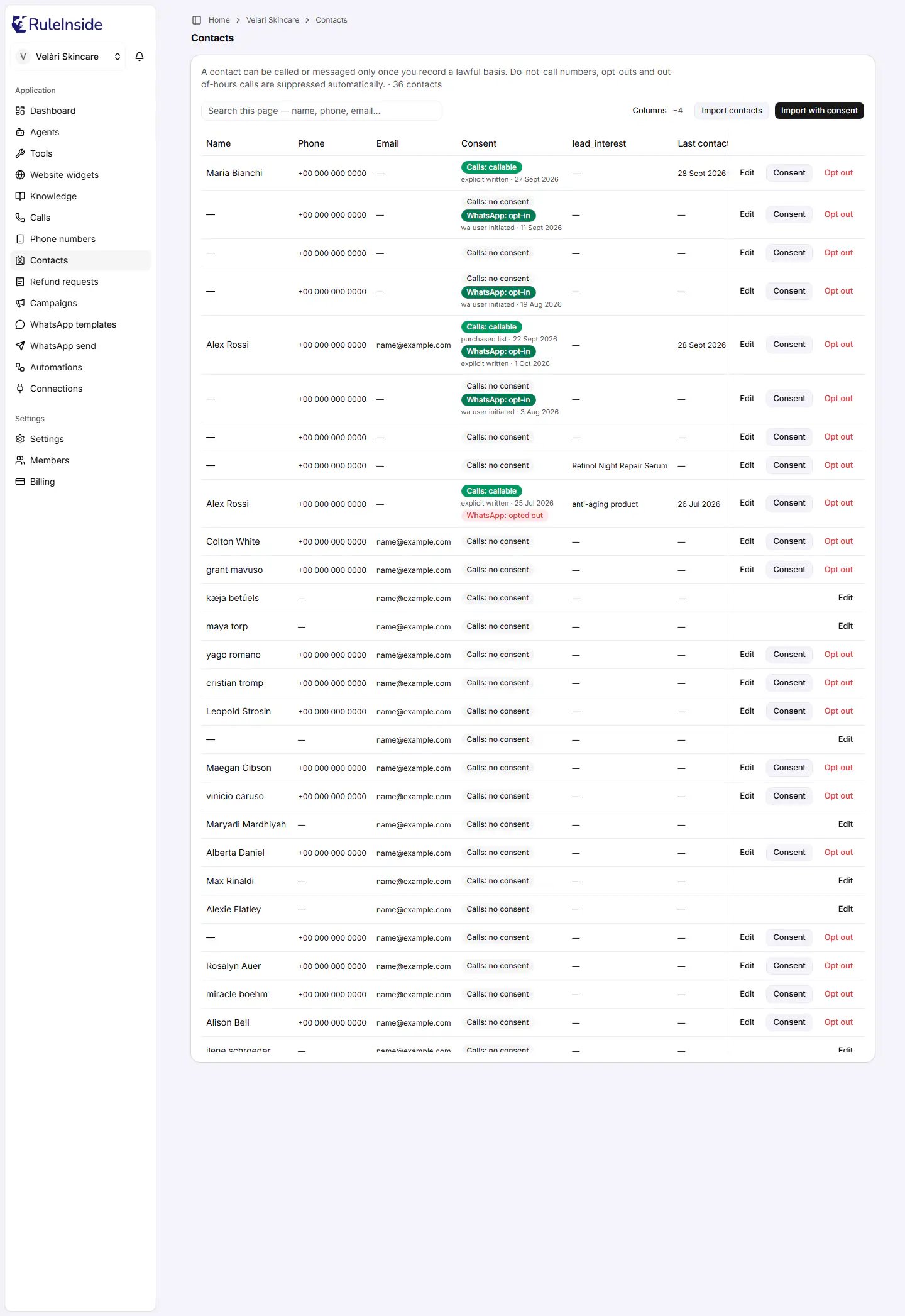
**Contacts** is your store's list of customers for outbound calls and WhatsApp messages, with consent and opt-outs
built in. The rule that governs the whole page is printed at the top:
> A contact can be called or messaged only once you record a lawful basis. Do-not-call numbers, opt-outs and
> out-of-hours calls are suppressed automatically.
When you have contacts, the same line ends with the total, for example "· 36 contacts".
Contacts belong to your whole store, not to one agent, so this page has no agent selector.
 ## Two words used on this page
* **Lawful basis:** the reason you are allowed to contact a person, for example "they ticked a box at checkout" or
"they are an existing customer". You record which basis you rely on for each contact. RuleInside does not check
that the basis is true; you are responsible for it.
* **Consent:** on a contact, consent means you have recorded a lawful basis **for one channel**. Phone calls and
WhatsApp are recorded separately, and one never implies the other.
## How a contact becomes reachable
A newly imported contact cannot be called or messaged. It becomes reachable on a channel only once a lawful basis is
recorded for that channel. Even then, every call and every message is checked at the moment it is sent:
1. your store's [Calling consent](/calling-hours) confirmation;
2. the person has not opted out;
3. the number is not on your do-not-call list;
4. consent is recorded for that channel;
5. it is inside your calling hours (calls only);
6. the person has not been contacted too often, and your account is within its daily limit.
If any check fails, the person is not contacted. See
[How calling rules protect your customers](/outbound-rules).
## Who can do what here
| Action | Member | Owner |
| - | - | - |
| See the list, search it, page through it | Yes | Yes |
| Choose which columns you see, and their order | Yes | Yes |
| **Opt out** a contact | **Yes** | Yes |
| **Import contacts**, **Import with consent** | No | Yes |
| **Edit** a contact | No | Yes |
| Record or update consent (**Consent**) | No | Yes |
| **Add column**, **Manage fields** | No | Yes |
| See and decide [store accounts to review](#store-accounts-to-review) | No | Yes |
Opting someone out is open to every member on purpose: honouring a "stop contacting me" request should never wait for
an owner.
A member sees this where the import buttons would be: "Only account owners can import contacts or change consent -
ask an owner of your team." If a member tries an owner action anyway, it is refused with "Permission denied: this
action requires an account owner (billing) permission."
## The buttons at the top
* **Columns** opens the Columns panel, where you choose what you see and owners manage the workspace's custom fields.
When columns are hidden, the button shows how many, for example "Columns -2". See
[Showing, hiding and adding columns](/importing-contacts#showing-hiding-and-adding-columns).
* **Import contacts** imports a CSV. The people arrive as **Calls: no consent**. Owners only.
* **Import with consent** imports a CSV and records a lawful basis to call for everyone in it. Owners only.
Both import buttons are greyed out until a store is linked to your workspace. Everything about importing is on
[Importing contacts](/importing-contacts).
## The list
The list shows **50 contacts per page**, newest first. When there is more than one page, "Page 1 of 3" appears with
**Previous** and **Next** (greyed out on the first and last page). The header row stays visible while you scroll.
| Column | What it shows | Can you hide it? |
| - | - | - |
| **Name** | The contact's name, or a dash if there is none | Yes |
| **Phone** | The phone number as stored, or a dash | No. The phone number is the contact's key: consent and the do-not-call list are tied to it. |
| **Email** | The email, or a dash | Yes |
| **Consent** | The consent badges, and under a **Calls: callable** or **WhatsApp: opt-in** badge a small line with the basis and the date, for example "explicit written · 27 Sept 2026" | No |
| One column per custom field | The value stored for that contact, or a dash. The header is the field name, for example `lead_interest`. | Yes. Hidden by default when no contact on the page has a value. |
| **Last contacted** | The date of the last outbound call attempt recorded for that contact, or a dash | Yes |
| Actions | The buttons for that contact | No. Always last, and pinned to the right edge so you can reach it when the table scrolls sideways. |
**Contacts without a phone number** can appear in the list. They come from your store's orders and customers, from
conversations, or from other sources. They cannot be called, granted consent or opted out from this page; owners can
only edit them.
### Searching
The **Search this page** box appears when there are contacts. It searches **only the contacts on the current page**
(up to 50), by name, phone, email and calling basis. To find someone on another page, move to that page with
**Previous** or **Next** and search again.
### When the list is not shown
| What you see | What it means |
| - | - |
| "This workspace isn't linked to a store yet." | No store is connected. The import buttons are greyed out. |
| "We couldn't load your contacts right now. Please refresh - if it keeps happening, contact support. (Nothing was changed.)" | The list could not be read. This is not the same as having no contacts. Refresh the page. |
| "No contacts yet. Import a CSV to get started." | Your store has no contacts yet. |
| "This page is empty - use Previous to go back." | The page number is past the end, for example from an old bookmark. |
| A message that no contacts on this page match your search | Your search filtered out every contact on the current page. |
## Store accounts to review
Sometimes a shopper creates or updates an account on your store with an email address that matches an older
contact who is not linked to any store account. RuleInside does not link them on its own: it shows the owner a
suggestion above the list, titled for example **1 store account to review**. Only owners see it, and only when there
is something to decide.
Each suggestion shows the contact (name, email and phone) and a line such as "Store account #123, seen" followed by
the date the match was first seen. You have two buttons:
* **Link** opens **Link this contact to the store account?**, which explains what linking does. Click **Yes, link
them** to link, or **Cancel**. You see "Contact linked to the store account."
* **Not the same person** dismisses the suggestion without changing the contact. You see "Marked as not the same
person." A dismissed suggestion does not come back.
Link only if you are sure it is the same person. Once linked, a shopper logged in to that store account is treated as
this contact: your agent greets them by this contact's name, can tell them this contact's order history, and sees
this contact's past call summaries, notes and preferences. Later changes to the account's name and email also update
this contact.
If linking is refused, nothing is changed and you see why, for example "This store account is already linked to
another contact. Nothing was changed." or "This contact is already linked to a store account. Nothing was changed."
## Consent badges
Each contact shows a **Calls** badge. A **WhatsApp** badge appears only when there is something to say about
WhatsApp.
| Badge | Colour | What it means |
| - | - | - |
| **Calls: no consent** | Grey | No lawful basis to call is recorded. The contact cannot be called. Every contact starts here after a plain import. |
| **Calls: callable** | Green | A lawful basis to call is recorded and the person has not opted out of calls. Each call is still checked against your do-not-call list, calling hours and limits. |
| **Calls: opted out** | Red | The person will never be called again. This wins over everything else: it shows even if a basis to call was recorded at some point. |
| **WhatsApp: opt-in** | Dark green | A lawful basis to message on WhatsApp is recorded and the person has not opted out of WhatsApp. |
| **WhatsApp: opted out** | Red | The person will not receive WhatsApp messages. |
| No WhatsApp badge | | No WhatsApp consent and no WhatsApp opt-out on record. Most contacts look like this. |
The two channels are independent. **Calls: callable** does not allow WhatsApp messages, and **WhatsApp: opt-in** does
not allow calls.
## The buttons on each contact
On a wide screen each contact shows up to three buttons. On a narrow screen, such as a phone, they collapse into one
"..." button that opens a menu with the same choices, with **Opt out** in red at the bottom.
| Button | Who sees it | When it shows | What it does |
| - | - | - | - |
| **Edit** | Owners | Always | Opens **Edit contact** |
| **Consent** (in the narrow menu: **Grant consent**, or **Update consent** when a basis to call is already recorded) | Owners | The contact has a phone, and at least one channel is still open (not opted out) | Opens **Record consent** |
| **Opt out** (red) | Every member | The contact has a phone and is not already opted out of calls | Opens **Opt this contact out?** |
So a contact with no phone shows only **Edit**, and only to owners.
## Recording consent for one contact
Use **Record consent** to record, or replace, the lawful basis for one contact on calls or on WhatsApp. Owners only.
The dialog shows the contact's name and number, with "record the lawful basis on which your agents may contact this
person on the channel you choose. You are responsible for having that basis."
| Field | What it does | Options and rules |
| - | - | - |
| **Channel** | Choose **Phone calls** or **WhatsApp**. | Shown only when both channels are open for this contact. A channel the person opted out of is never offered. The dialog opens on calls when calls are open. Switching channel clears the basis and the tick. |
| **Lawful basis to call**, or **Lawful basis to message on WhatsApp** | Choose the basis. Starts as "Choose a basis…". | The list depends on the channel. See [Lawful bases](#lawful-bases). |
| **I confirm the statement above.** | Appears under a fixed statement for the two bases that need one. | Must be ticked. Changing the basis clears it. |
**Buttons:** **Cancel** closes without saving. **Record consent** saves (it shows "Saving…" while it runs). It stays
greyed out until you choose a basis and tick any required statement.
**When you save,** the basis and today's date are recorded for that channel, replacing any earlier basis on that
channel, and a record of who did it is kept. You see one of these:
* "Consent recorded - this contact can now be called."
* "Consent recorded - you can now message this contact on WhatsApp."
* "No change (the number could not be recorded)." Nothing was written.
* "Could not record consent." or a more specific message, for example when the stored number cannot be put in
international format.
You may also see these messages inside the dialog:
* "There is no channel available for this contact right now - they have opted out, or the lawful-basis list could
not be loaded." Refresh the page; if the person has opted out of both channels, consent cannot be recorded.
* "These are the options for a different channel, so consent cannot be recorded here right now. Please reload the
page, and contact support if it keeps happening." The save button stays greyed out.
There is no button that removes consent while leaving the contact reachable. **Update consent** replaces the basis;
it cannot set a contact back to **Calls: no consent**. To stop contacting someone, use **Opt out**.
### Lawful bases
| Basis, as shown in the picker | Calls | WhatsApp | Statement to confirm | Can you choose it? |
| - | - | - | - | - |
| Web / checkout opt-in | Yes | Yes | No | Yes |
| Explicit written consent | Yes | Yes | No | Yes |
| Verbal consent (recorded call) | Yes | No | No | Yes |
| Existing customer relationship | Yes | No | **Yes** | Yes |
| Purchased marketing list | Yes | No | **Yes** | Yes |
| WhatsApp user-initiated (messaged us first) | No | Yes | No | Yes |
| WhatsApp opt-in given on a recorded call | No | Yes | No | No. RuleInside records it when a person says yes to WhatsApp messages on a campaign call. |
| Replied START on WhatsApp | No | Yes | No | No. RuleInside records it when a person who had opted out of WhatsApp replies START. |
So on WhatsApp you can choose from three bases, and none of them needs a statement. The two bases with a statement
are for calls only, because the statement is about phone calls.
Under each **Calls: callable** or **WhatsApp: opt-in** badge, the small line shows the basis in short form (for
example "purchased list" or "wa user initiated") and the date it was recorded.
"I confirm that these contacts are existing customers, or people with whom I have a prior relationship that gives
me a lawful basis to contact them by phone using an automated AI voice agent, and that I am solely responsible for
the lawfulness of contacting them. I understand that RuleInside applies do-not-call, opt-out, and calling-time
suppression on my behalf."
"I confirm that I have a lawful basis to contact these people by phone using an automated AI voice agent, that the
contacts were obtained in a way that permits such calls, and that I am solely responsible for the lawfulness of
contacting them. I understand that RuleInside applies do-not-call, opt-out, and calling-time suppression on my
behalf, but does not verify how I obtained these contacts or whether I may lawfully call them."
The statement you confirm is stored word for word, together with who confirmed it and when.
## Editing a contact
## Two words used on this page
* **Lawful basis:** the reason you are allowed to contact a person, for example "they ticked a box at checkout" or
"they are an existing customer". You record which basis you rely on for each contact. RuleInside does not check
that the basis is true; you are responsible for it.
* **Consent:** on a contact, consent means you have recorded a lawful basis **for one channel**. Phone calls and
WhatsApp are recorded separately, and one never implies the other.
## How a contact becomes reachable
A newly imported contact cannot be called or messaged. It becomes reachable on a channel only once a lawful basis is
recorded for that channel. Even then, every call and every message is checked at the moment it is sent:
1. your store's [Calling consent](/calling-hours) confirmation;
2. the person has not opted out;
3. the number is not on your do-not-call list;
4. consent is recorded for that channel;
5. it is inside your calling hours (calls only);
6. the person has not been contacted too often, and your account is within its daily limit.
If any check fails, the person is not contacted. See
[How calling rules protect your customers](/outbound-rules).
## Who can do what here
| Action | Member | Owner |
| - | - | - |
| See the list, search it, page through it | Yes | Yes |
| Choose which columns you see, and their order | Yes | Yes |
| **Opt out** a contact | **Yes** | Yes |
| **Import contacts**, **Import with consent** | No | Yes |
| **Edit** a contact | No | Yes |
| Record or update consent (**Consent**) | No | Yes |
| **Add column**, **Manage fields** | No | Yes |
| See and decide [store accounts to review](#store-accounts-to-review) | No | Yes |
Opting someone out is open to every member on purpose: honouring a "stop contacting me" request should never wait for
an owner.
A member sees this where the import buttons would be: "Only account owners can import contacts or change consent -
ask an owner of your team." If a member tries an owner action anyway, it is refused with "Permission denied: this
action requires an account owner (billing) permission."
## The buttons at the top
* **Columns** opens the Columns panel, where you choose what you see and owners manage the workspace's custom fields.
When columns are hidden, the button shows how many, for example "Columns -2". See
[Showing, hiding and adding columns](/importing-contacts#showing-hiding-and-adding-columns).
* **Import contacts** imports a CSV. The people arrive as **Calls: no consent**. Owners only.
* **Import with consent** imports a CSV and records a lawful basis to call for everyone in it. Owners only.
Both import buttons are greyed out until a store is linked to your workspace. Everything about importing is on
[Importing contacts](/importing-contacts).
## The list
The list shows **50 contacts per page**, newest first. When there is more than one page, "Page 1 of 3" appears with
**Previous** and **Next** (greyed out on the first and last page). The header row stays visible while you scroll.
| Column | What it shows | Can you hide it? |
| - | - | - |
| **Name** | The contact's name, or a dash if there is none | Yes |
| **Phone** | The phone number as stored, or a dash | No. The phone number is the contact's key: consent and the do-not-call list are tied to it. |
| **Email** | The email, or a dash | Yes |
| **Consent** | The consent badges, and under a **Calls: callable** or **WhatsApp: opt-in** badge a small line with the basis and the date, for example "explicit written · 27 Sept 2026" | No |
| One column per custom field | The value stored for that contact, or a dash. The header is the field name, for example `lead_interest`. | Yes. Hidden by default when no contact on the page has a value. |
| **Last contacted** | The date of the last outbound call attempt recorded for that contact, or a dash | Yes |
| Actions | The buttons for that contact | No. Always last, and pinned to the right edge so you can reach it when the table scrolls sideways. |
**Contacts without a phone number** can appear in the list. They come from your store's orders and customers, from
conversations, or from other sources. They cannot be called, granted consent or opted out from this page; owners can
only edit them.
### Searching
The **Search this page** box appears when there are contacts. It searches **only the contacts on the current page**
(up to 50), by name, phone, email and calling basis. To find someone on another page, move to that page with
**Previous** or **Next** and search again.
### When the list is not shown
| What you see | What it means |
| - | - |
| "This workspace isn't linked to a store yet." | No store is connected. The import buttons are greyed out. |
| "We couldn't load your contacts right now. Please refresh - if it keeps happening, contact support. (Nothing was changed.)" | The list could not be read. This is not the same as having no contacts. Refresh the page. |
| "No contacts yet. Import a CSV to get started." | Your store has no contacts yet. |
| "This page is empty - use Previous to go back." | The page number is past the end, for example from an old bookmark. |
| A message that no contacts on this page match your search | Your search filtered out every contact on the current page. |
## Store accounts to review
Sometimes a shopper creates or updates an account on your store with an email address that matches an older
contact who is not linked to any store account. RuleInside does not link them on its own: it shows the owner a
suggestion above the list, titled for example **1 store account to review**. Only owners see it, and only when there
is something to decide.
Each suggestion shows the contact (name, email and phone) and a line such as "Store account #123, seen" followed by
the date the match was first seen. You have two buttons:
* **Link** opens **Link this contact to the store account?**, which explains what linking does. Click **Yes, link
them** to link, or **Cancel**. You see "Contact linked to the store account."
* **Not the same person** dismisses the suggestion without changing the contact. You see "Marked as not the same
person." A dismissed suggestion does not come back.
Link only if you are sure it is the same person. Once linked, a shopper logged in to that store account is treated as
this contact: your agent greets them by this contact's name, can tell them this contact's order history, and sees
this contact's past call summaries, notes and preferences. Later changes to the account's name and email also update
this contact.
If linking is refused, nothing is changed and you see why, for example "This store account is already linked to
another contact. Nothing was changed." or "This contact is already linked to a store account. Nothing was changed."
## Consent badges
Each contact shows a **Calls** badge. A **WhatsApp** badge appears only when there is something to say about
WhatsApp.
| Badge | Colour | What it means |
| - | - | - |
| **Calls: no consent** | Grey | No lawful basis to call is recorded. The contact cannot be called. Every contact starts here after a plain import. |
| **Calls: callable** | Green | A lawful basis to call is recorded and the person has not opted out of calls. Each call is still checked against your do-not-call list, calling hours and limits. |
| **Calls: opted out** | Red | The person will never be called again. This wins over everything else: it shows even if a basis to call was recorded at some point. |
| **WhatsApp: opt-in** | Dark green | A lawful basis to message on WhatsApp is recorded and the person has not opted out of WhatsApp. |
| **WhatsApp: opted out** | Red | The person will not receive WhatsApp messages. |
| No WhatsApp badge | | No WhatsApp consent and no WhatsApp opt-out on record. Most contacts look like this. |
The two channels are independent. **Calls: callable** does not allow WhatsApp messages, and **WhatsApp: opt-in** does
not allow calls.
## The buttons on each contact
On a wide screen each contact shows up to three buttons. On a narrow screen, such as a phone, they collapse into one
"..." button that opens a menu with the same choices, with **Opt out** in red at the bottom.
| Button | Who sees it | When it shows | What it does |
| - | - | - | - |
| **Edit** | Owners | Always | Opens **Edit contact** |
| **Consent** (in the narrow menu: **Grant consent**, or **Update consent** when a basis to call is already recorded) | Owners | The contact has a phone, and at least one channel is still open (not opted out) | Opens **Record consent** |
| **Opt out** (red) | Every member | The contact has a phone and is not already opted out of calls | Opens **Opt this contact out?** |
So a contact with no phone shows only **Edit**, and only to owners.
## Recording consent for one contact
Use **Record consent** to record, or replace, the lawful basis for one contact on calls or on WhatsApp. Owners only.
The dialog shows the contact's name and number, with "record the lawful basis on which your agents may contact this
person on the channel you choose. You are responsible for having that basis."
| Field | What it does | Options and rules |
| - | - | - |
| **Channel** | Choose **Phone calls** or **WhatsApp**. | Shown only when both channels are open for this contact. A channel the person opted out of is never offered. The dialog opens on calls when calls are open. Switching channel clears the basis and the tick. |
| **Lawful basis to call**, or **Lawful basis to message on WhatsApp** | Choose the basis. Starts as "Choose a basis…". | The list depends on the channel. See [Lawful bases](#lawful-bases). |
| **I confirm the statement above.** | Appears under a fixed statement for the two bases that need one. | Must be ticked. Changing the basis clears it. |
**Buttons:** **Cancel** closes without saving. **Record consent** saves (it shows "Saving…" while it runs). It stays
greyed out until you choose a basis and tick any required statement.
**When you save,** the basis and today's date are recorded for that channel, replacing any earlier basis on that
channel, and a record of who did it is kept. You see one of these:
* "Consent recorded - this contact can now be called."
* "Consent recorded - you can now message this contact on WhatsApp."
* "No change (the number could not be recorded)." Nothing was written.
* "Could not record consent." or a more specific message, for example when the stored number cannot be put in
international format.
You may also see these messages inside the dialog:
* "There is no channel available for this contact right now - they have opted out, or the lawful-basis list could
not be loaded." Refresh the page; if the person has opted out of both channels, consent cannot be recorded.
* "These are the options for a different channel, so consent cannot be recorded here right now. Please reload the
page, and contact support if it keeps happening." The save button stays greyed out.
There is no button that removes consent while leaving the contact reachable. **Update consent** replaces the basis;
it cannot set a contact back to **Calls: no consent**. To stop contacting someone, use **Opt out**.
### Lawful bases
| Basis, as shown in the picker | Calls | WhatsApp | Statement to confirm | Can you choose it? |
| - | - | - | - | - |
| Web / checkout opt-in | Yes | Yes | No | Yes |
| Explicit written consent | Yes | Yes | No | Yes |
| Verbal consent (recorded call) | Yes | No | No | Yes |
| Existing customer relationship | Yes | No | **Yes** | Yes |
| Purchased marketing list | Yes | No | **Yes** | Yes |
| WhatsApp user-initiated (messaged us first) | No | Yes | No | Yes |
| WhatsApp opt-in given on a recorded call | No | Yes | No | No. RuleInside records it when a person says yes to WhatsApp messages on a campaign call. |
| Replied START on WhatsApp | No | Yes | No | No. RuleInside records it when a person who had opted out of WhatsApp replies START. |
So on WhatsApp you can choose from three bases, and none of them needs a statement. The two bases with a statement
are for calls only, because the statement is about phone calls.
Under each **Calls: callable** or **WhatsApp: opt-in** badge, the small line shows the basis in short form (for
example "purchased list" or "wa user initiated") and the date it was recorded.
"I confirm that these contacts are existing customers, or people with whom I have a prior relationship that gives
me a lawful basis to contact them by phone using an automated AI voice agent, and that I am solely responsible for
the lawfulness of contacting them. I understand that RuleInside applies do-not-call, opt-out, and calling-time
suppression on my behalf."
"I confirm that I have a lawful basis to contact these people by phone using an automated AI voice agent, that the
contacts were obtained in a way that permits such calls, and that I am solely responsible for the lawfulness of
contacting them. I understand that RuleInside applies do-not-call, opt-out, and calling-time suppression on my
behalf, but does not verify how I obtained these contacts or whether I may lawfully call them."
The statement you confirm is stored word for word, together with who confirmed it and when.
## Editing a contact
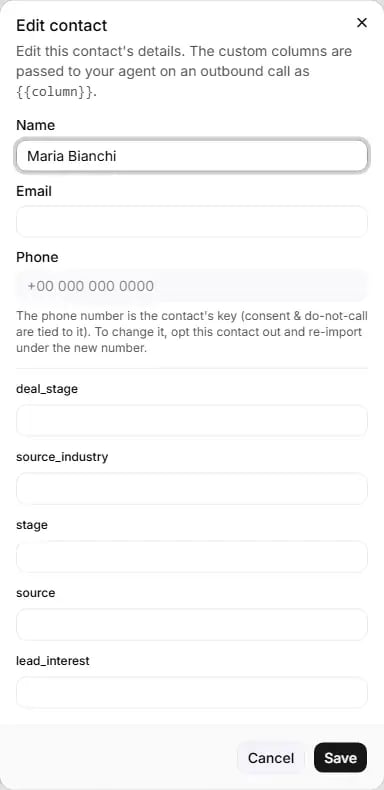 **Edit** opens **Edit contact**, where an owner corrects a contact's details and fills in their custom fields. The
custom columns are passed to your agent on an outbound call as variables.
| Field | Can you change it? | Notes |
| - | - | - |
| **Name** | Yes | Free text. |
| **Email** | Yes | An email can belong to only one contact in your store. |
| **Phone** | No (greyed out) | "The phone number is the contact's key (consent & do-not-call are tied to it). To change it, opt this contact out and re-import under the new number." |
| One box per custom field, labelled with the field name | Yes | Leave a box blank to clear that value. |
**Buttons:** **Cancel** closes without saving. **Save** saves (it shows "Saving…"). You see "Contact saved.", or
"Could not save the contact." if it failed.
Values for fields that are not current workspace columns are kept as they are. To add a column, see
[Workspace fields](/importing-contacts#workspace-fields-owners-only).
## Opting a contact out
Use **Opt out** when a person asks not to be contacted. Any member can do it.
The confirmation, **Opt this contact out?**, reads: "+15551234567 will be added to your do-not-call list for both
calls and WhatsApp, and any consent on either channel will be revoked. This suppression survives a re-import and
cannot be reversed from the portal. On WhatsApp, the customer can opt back in themselves by replying START."
**Buttons:** **Cancel** closes without changing anything. **Opt out** opts the contact out straight away.
**What happens when you click Opt out:**
* The contact is opted out of **calls and WhatsApp**, and any consent on either channel is removed.
* The number is added to your do-not-call list for calls and for WhatsApp.
* Any calls already scheduled for the contact are cancelled, and any WhatsApp messages waiting to be sent to them are
stopped.
* A record is kept for each channel.
* You see "Contact opted out - they will not be contacted again on calls or WhatsApp."
If the stored number is not in international format, the opt-out cannot be completed and you see: "We couldn't opt
this contact out - the stored phone number isn't in international format. Please edit the contact to a +… number
and try again." The phone number cannot be edited in the portal, so if you see this message, contact support.
Other failures show "Could not opt this contact out."
**An opt-out cannot be undone by you.** Not with a button, not by importing the number again (an import never
touches opt-outs or the do-not-call list), and not by recording consent again (the opt-out still wins, and the badge
stays **Calls: opted out**). Only the customer can reverse it, and only for WhatsApp, by replying START. See
[WhatsApp](/whatsapp).
The **Opt out** button stays until the contact is opted out of **both** calls and WhatsApp. If the person opted out
of calls only, for example by saying so during a call, **Opt out** stops WhatsApp too.
## Your do-not-call list
Your store has a do-not-call list, kept separately for calls and for WhatsApp, and checked before every call and every
message. There is no page in the portal to view or edit it. Numbers are added to it when:
* someone uses **Opt out** on a contact (calls and WhatsApp);
* a person says during a call that they do not want to be called (calls);
* a person replies **STOP** on WhatsApp (calls and WhatsApp). The whole message must be the word STOP, in any letter case,
or a quick-reply button that says STOP. "Stop calling me" does not count;
* your own system sends a "do not call" request through a [Connection](/connections) (calls);
* your system uses the RuleInside API.
A STOP on WhatsApp stops both calls and WhatsApp. An opt-out from calls made during a call does not stop WhatsApp.
## Common questions
A plain import adds people as **Calls: no consent**. Record a lawful basis with **Import with consent**, or with
**Consent** on each contact. If the badges say **Calls: callable** and still nobody is called, check
[Settings, Calling consent](/calling-hours): until an owner confirms it, nothing is sent. Then check your calling
hours and days.
No, only owners. Any member can opt a contact out.
No. Not with a button, not by importing the number again, and not by recording consent again. On WhatsApp, the
customer can opt back in by replying START. For calls there is no way back.
Yes. **Opt out** stops both calls and WhatsApp, and cancels anything already scheduled for that contact on either
channel.
Use **Opt out** on that contact: it is still shown while WhatsApp is open, and it stops WhatsApp too. The customer
can also reply **STOP** on WhatsApp, or your own system can opt them out through the RuleInside API.
No. Each channel needs its own lawful basis.
That basis, and Purchased marketing list, are for calls only, because their statement is about phone calls. On
WhatsApp you can choose Web / checkout opt-in, Explicit written consent, or WhatsApp user-initiated (messaged us
first).
Not in the portal. **Update consent** changes the basis but cannot remove it. To stop contacting someone, use
**Opt out**.
No. You are responsible for it. RuleInside records who recorded which basis and when and, for the two bases with
a statement, the exact statement that was confirmed.
You cannot edit it, because consent and the do-not-call list are tied to the number. If needed, opt the old number
out, then import the new number. Always write numbers in international format with a `+` and no spaces, for
example `+15551234567`.
Search covers only the current page of 50 contacts. Use **Next** to move through the pages.
They came from your store's orders and customers, or from conversations. They cannot be called, given consent or
opted out from this page. Owners can edit them.
The date of the last outbound call attempt recorded for that contact.
This documentation is built and hosted on [Mintlify](https://mintlify.com), a developer documentation platform.
**Edit** opens **Edit contact**, where an owner corrects a contact's details and fills in their custom fields. The
custom columns are passed to your agent on an outbound call as variables.
| Field | Can you change it? | Notes |
| - | - | - |
| **Name** | Yes | Free text. |
| **Email** | Yes | An email can belong to only one contact in your store. |
| **Phone** | No (greyed out) | "The phone number is the contact's key (consent & do-not-call are tied to it). To change it, opt this contact out and re-import under the new number." |
| One box per custom field, labelled with the field name | Yes | Leave a box blank to clear that value. |
**Buttons:** **Cancel** closes without saving. **Save** saves (it shows "Saving…"). You see "Contact saved.", or
"Could not save the contact." if it failed.
Values for fields that are not current workspace columns are kept as they are. To add a column, see
[Workspace fields](/importing-contacts#workspace-fields-owners-only).
## Opting a contact out
Use **Opt out** when a person asks not to be contacted. Any member can do it.
The confirmation, **Opt this contact out?**, reads: "+15551234567 will be added to your do-not-call list for both
calls and WhatsApp, and any consent on either channel will be revoked. This suppression survives a re-import and
cannot be reversed from the portal. On WhatsApp, the customer can opt back in themselves by replying START."
**Buttons:** **Cancel** closes without changing anything. **Opt out** opts the contact out straight away.
**What happens when you click Opt out:**
* The contact is opted out of **calls and WhatsApp**, and any consent on either channel is removed.
* The number is added to your do-not-call list for calls and for WhatsApp.
* Any calls already scheduled for the contact are cancelled, and any WhatsApp messages waiting to be sent to them are
stopped.
* A record is kept for each channel.
* You see "Contact opted out - they will not be contacted again on calls or WhatsApp."
If the stored number is not in international format, the opt-out cannot be completed and you see: "We couldn't opt
this contact out - the stored phone number isn't in international format. Please edit the contact to a +… number
and try again." The phone number cannot be edited in the portal, so if you see this message, contact support.
Other failures show "Could not opt this contact out."
**An opt-out cannot be undone by you.** Not with a button, not by importing the number again (an import never
touches opt-outs or the do-not-call list), and not by recording consent again (the opt-out still wins, and the badge
stays **Calls: opted out**). Only the customer can reverse it, and only for WhatsApp, by replying START. See
[WhatsApp](/whatsapp).
The **Opt out** button stays until the contact is opted out of **both** calls and WhatsApp. If the person opted out
of calls only, for example by saying so during a call, **Opt out** stops WhatsApp too.
## Your do-not-call list
Your store has a do-not-call list, kept separately for calls and for WhatsApp, and checked before every call and every
message. There is no page in the portal to view or edit it. Numbers are added to it when:
* someone uses **Opt out** on a contact (calls and WhatsApp);
* a person says during a call that they do not want to be called (calls);
* a person replies **STOP** on WhatsApp (calls and WhatsApp). The whole message must be the word STOP, in any letter case,
or a quick-reply button that says STOP. "Stop calling me" does not count;
* your own system sends a "do not call" request through a [Connection](/connections) (calls);
* your system uses the RuleInside API.
A STOP on WhatsApp stops both calls and WhatsApp. An opt-out from calls made during a call does not stop WhatsApp.
## Common questions
A plain import adds people as **Calls: no consent**. Record a lawful basis with **Import with consent**, or with
**Consent** on each contact. If the badges say **Calls: callable** and still nobody is called, check
[Settings, Calling consent](/calling-hours): until an owner confirms it, nothing is sent. Then check your calling
hours and days.
No, only owners. Any member can opt a contact out.
No. Not with a button, not by importing the number again, and not by recording consent again. On WhatsApp, the
customer can opt back in by replying START. For calls there is no way back.
Yes. **Opt out** stops both calls and WhatsApp, and cancels anything already scheduled for that contact on either
channel.
Use **Opt out** on that contact: it is still shown while WhatsApp is open, and it stops WhatsApp too. The customer
can also reply **STOP** on WhatsApp, or your own system can opt them out through the RuleInside API.
No. Each channel needs its own lawful basis.
That basis, and Purchased marketing list, are for calls only, because their statement is about phone calls. On
WhatsApp you can choose Web / checkout opt-in, Explicit written consent, or WhatsApp user-initiated (messaged us
first).
Not in the portal. **Update consent** changes the basis but cannot remove it. To stop contacting someone, use
**Opt out**.
No. You are responsible for it. RuleInside records who recorded which basis and when and, for the two bases with
a statement, the exact statement that was confirmed.
You cannot edit it, because consent and the do-not-call list are tied to the number. If needed, opt the old number
out, then import the new number. Always write numbers in international format with a `+` and no spaces, for
example `+15551234567`.
Search covers only the current page of 50 contacts. Use **Next** to move through the pages.
They came from your store's orders and customers, or from conversations. They cannot be called, given consent or
opted out from this page. Owners can edit them.
The date of the last outbound call attempt recorded for that contact.
This documentation is built and hosted on [Mintlify](https://mintlify.com), a developer documentation platform.