> ## Documentation Index
> Fetch the complete documentation index at: https://docs.ruleinside.com/llms.txt
> Use this file to discover all available pages before exploring further.
# Sending a WhatsApp message
> Send one template message to one customer, follow it in the send log, and understand why a send was held or suppressed.
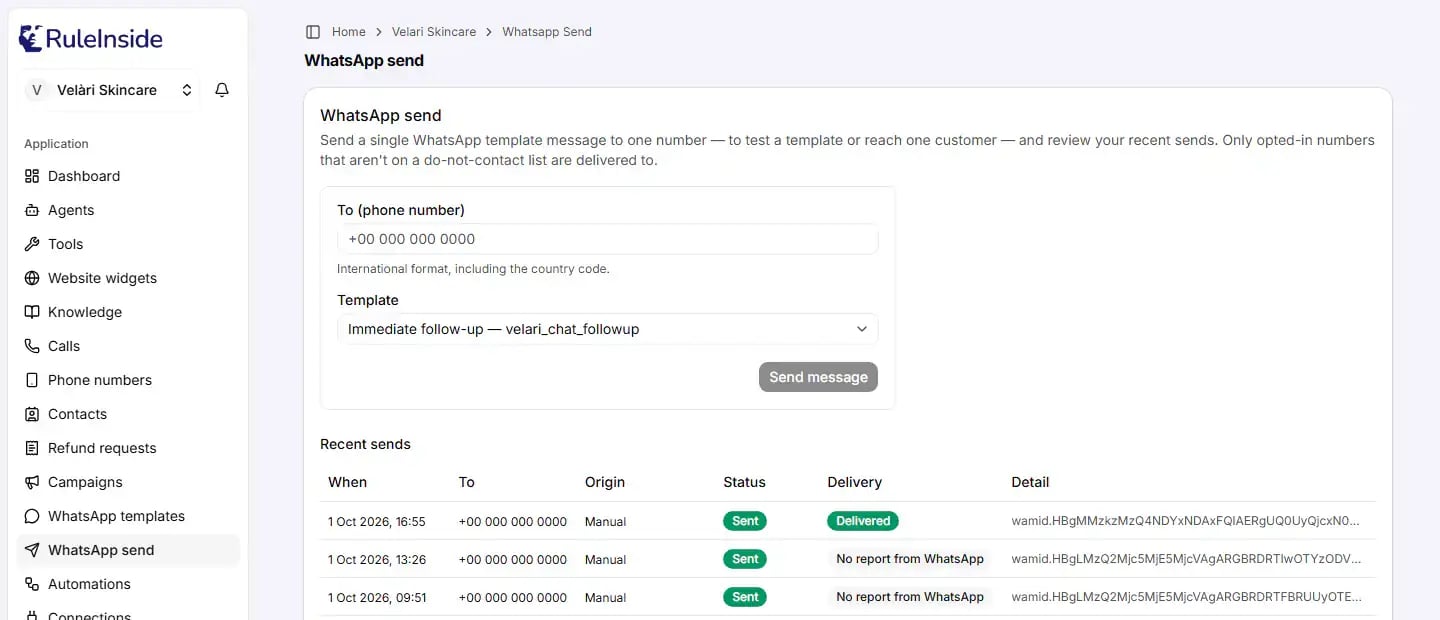
**WhatsApp send** sends a single WhatsApp template message to one number, to test a template or to reach one
customer, and shows your recent sends. It sends one message to one number each time. There is no free-text message
and no bulk sending on this page: to reach many people, use [Campaigns](/campaigns).
 ## Before you send
Check these four things first. A send that fails any of them is not delivered.
Register the template under [WhatsApp templates](/whatsapp-templates), with **Kind** set to **Message** and
**Enabled** on.
The person must be a saved contact in [Contacts](/contacts), with their number in international format starting
with `+` (for example `+15551234567`).
The contact must have WhatsApp consent recorded. Consent to calls does not count for WhatsApp.
An owner must have completed the confirmation under **Settings › Calling consent**. Until then, no calls or
messages are sent.
**A number that is not a saved contact is refused.** RuleInside looks up the contact by the exact number you type.
If there is no contact with that number, the message is not sent and the send log shows **Suppressed** with the
reason `opt_out`. Add the contact first, then record their WhatsApp consent, then send.
## Sending a message
Type the recipient's number in **To (phone number)**, in international format with the country code.
Pick it under **Template**.
If the template uses send-time values, type each one under **Template variables**.
This does not send yet: it opens a confirmation.
The message is sent, or the page tells you why it was not.
## Every field
Only the account owner can fill in and send this form.
| Field | What it does | Allowed values and limits | Default | Who can change it |
| - | - | - | - | - |
| **To (phone number)** | The recipient's WhatsApp number. | International format, including the country code: it must start with `+` or `00`. Spaces, dashes and brackets are fine. Letters (for example an extension such as `x12`) are not allowed, and a number without `+` or `00` is refused, because no default country is assumed. The example in the box is `+15551234567`. | Empty | Owner |
| **Template** | Which registered template to send. Each option shows the purpose followed by the template name. | Only templates whose **Kind** is **Message** and which are **Enabled**. | The first template in the list | Owner |
| **Template variables** | One box for each send-time value the chosen template uses, labelled with that value's name. If one name fills two blanks, there is one box. Shown only when the template has send-time values. | Every box must be filled. | Empty. The boxes are cleared whenever you change the template. | Owner |
Values set as **Fixed text** on the template are not shown here: they are the same on every send. Values set as
**Contact field** are not shown either: they are filled from the contact whose saved number matches the number you
typed. When a template uses contact fields, the form says so: "This template uses contact fields (e.g. name). Those
are filled from the contact matching this number - if no matching contact exists, the send is blocked."
Contact details are matched on the number exactly as saved. Save your contacts' numbers in international format
starting with `+`, so they match what you type here.
If the number cannot be used, a red message says: "A valid E.164 phone (or a default\_calling\_code) is required."
Retype the number starting with `+` and the country code.
### What the page shows instead of the form
* **You have no enabled WhatsApp message template yet.** Register a message template, or enable an existing one,
under **WhatsApp templates**. Call permission templates cannot be used to send a message.
* **We couldn't load your WhatsApp templates right now.** Refresh the page; contact support if it keeps happening.
* **This workspace isn't linked to a store yet.** No form and no log are shown. Contact support.
* A member who is not the owner sees a note that only account owners can send WhatsApp messages. The **Recent
sends** log is still visible to them.
## Buttons and the confirmation
| Button | What happens |
| - | - |
| **Send message** | Greyed out until a number is typed, a template is chosen and every variable box is filled. It does not send: it opens the confirmation. |
| **Cancel** (in the confirmation) | Closes the confirmation. Nothing is sent. |
| **Send now** (in the confirmation) | Sends the message. It reads **Sending…** while it works, and the confirmation cannot be closed until it finishes. |
The confirmation is titled **Send this WhatsApp message?** and reminds you that this sends a **real WhatsApp
message** to the number you typed, may incur a messaging charge, and is skipped if the number is opted out, on a
do-not-contact list, or has no WhatsApp consent.
**A sent message cannot be recalled.** Every click of **Send now** sends a new message: a second click is not
recognised as a repeat. After each completed send the form clears the number and the variables, so you do not send
the same message twice by accident.
## What happens after Send now
RuleInside checks your account is active, finds the enabled template, finds the contact by number, runs the checks
described in [Why a send is suppressed](#why-a-send-is-suppressed), fills in the variables, picks the sending
number, and tries to send straight away. The checks run again just before the message goes out.
A message appears at the bottom of the screen with the result:
| What happened | Message you see |
| - | - |
| WhatsApp accepted the message | **Message Sent - it's on its way.** |
| Waiting in the queue to be sent | **Message Queued - it's on its way.** |
| Being sent right now | **Message Sending - it's on its way.** |
| Held until later (calling hours, missing time zone, or WhatsApp blocking your account) | **Queued, not sent yet (…)**, with the reason in brackets, for example "held: outside the calling hours where this person is; it is sent when they open" |
| Refused by the checks | **Not sent (Suppressed): …**, with a reason such as `no_consent`, `opt_out`, `dnc` or `frequency_cap`. See [the reasons](#reasons-you-may-see). |
| A variable came out empty | **Not sent (Failed): unresolved template params at index \[n].** |
| WhatsApp refused the message | **Not sent (Failed): Failed.** |
| WhatsApp asked us to slow down; it will be retried | **Not sent (Retrying): Retrying.** |
| No clear answer came back | **We could not confirm whether this message reached WhatsApp. Check the send log before sending it again, so the person does not receive it twice.** |
| The request could not be made | A red message with the reason, or **Could not send the WhatsApp message.** |
Other refusals you may see in red:
* **This account is not active; outbound WhatsApp is disabled.** Your account is suspended, on hold or not yet set
up. Contact support.
* **No WhatsApp account with messaging enabled + an assigned agent is available for this client.** On **Phone
numbers**, check that your WhatsApp number has **Messaging enabled** switched on and an agent assigned.
* **No enabled WhatsApp message template configured for purpose …** The template you chose is no longer enabled.
Enable it under **WhatsApp templates**.
## Recent sends
Under **Recent sends** you see your newest 100 WhatsApp sends, newest first. The log covers every WhatsApp message
your store sends, not only the ones sent from this page: automatic follow-ups, event follow-ups, campaigns and manual
sends. Every member can see it.
If nothing has been sent yet it says **No WhatsApp sends yet.** If the log cannot be loaded, refresh the page and
contact support if it keeps happening.
| Column | What it shows |
| - | - |
| **When** | When the message was created, in your own browser's time zone. |
| **To** | The recipient's number. |
| **Origin** | What sent it: **Immediate follow-up**, **Event follow-up**, **Re-engagement**, **Manual** or **Campaign**. Follow-ups after campaign calls show their own names, for example "Call Answered Followup" and "Call Missed Followup". |
| **Status** | Where the message is in RuleInside. See below. |
| **Delivery** | What WhatsApp reported after accepting it. See below. |
| **Detail** | One line, cut short; hover to read it all. It shows WhatsApp's failure reason and code, the reason a send was suppressed, a hold or error message, or WhatsApp's reference for the message. A dash when there is nothing to show. |
### Status
| Status | Colour | Meaning | What happens next |
| - | - | - | - |
| **Queued** | Grey | Waiting to be sent: due for its first try, held for the person's calling hours, or held while WhatsApp blocks your account. **Detail** shows the reason when it is held. | Sent when it is due. |
| **Sending** | Grey | Being sent right now. | Becomes **Sent**, **Retrying**, **Failed** or **Unconfirmed**. |
| **Sent** | Green | WhatsApp accepted the message. This is not proof it reached the phone: see **Delivery**. | Nothing more. |
| **Retrying** | Grey | An attempt failed in a way that is safe to repeat (for example WhatsApp asked us to slow down), or a check could not be read at that moment. | Tried again after about 5, 10, 15 and then 30 minutes. After 5 attempts it becomes **Failed**. |
| **Suppressed** | Red | Refused by the checks: the person may not be contacted (or the campaign was cancelled). **Detail** shows the reason. | Never sent. Sending again creates a new attempt that is checked afresh. |
| **Failed** | Red | Will not be sent: WhatsApp refused it, a variable was empty, the retries ran out, or it was queued 7 days or more ago and was still waiting for WhatsApp to unblock your account or for the contact's time zone. | Nothing more. Our team is notified of most of these. |
| **Unconfirmed** | Red | The message may have reached WhatsApp, but no clear answer came back. | Not retried automatically, so the person is not messaged twice. Our team is notified. Check before sending again. |
### Delivery
Delivery reports come from Meta, so they appear only when your WhatsApp number is connected through Meta (it shows
the **Connected through Meta** badge on **Phone numbers**). For any other number, **Delivery** always shows **No
report from WhatsApp**.
| Delivery | Colour | Meaning |
| - | - | - |
| **Delivered** | Green | WhatsApp reports it reached at least one of the person's devices. |
| **Read** | Green | WhatsApp reports the person read it. |
| **Accepted by WhatsApp** | Grey | WhatsApp accepted it but has not yet reported it delivered. |
| **Not delivered** | Red | WhatsApp reports it could not be delivered. **Detail** shows WhatsApp's reason and code. It is not sent again automatically. |
| **No report from WhatsApp** | Grey | Sent, or possibly sent, but no report has arrived. |
| **Not sent** | Grey | The message never went to WhatsApp (its status is **Queued**, **Retrying**, **Suppressed** or **Failed**). |
A later report never moves a message backwards: for example, **Delivered** is not replaced by **Accepted by
WhatsApp**, and **Read** replaces everything else.
## Why a send is suppressed
These checks apply to every WhatsApp message your store sends: manual sends, follow-ups and campaigns. If a check
cannot be completed at that moment, the message is **not** sent.
1. **Your account is active.** A suspended account, or one not yet set up, sends nothing.
2. **Your store has confirmed its calling consent** under **Settings › Calling consent**, for the country it trades
in.
3. **The person has not opted out of WhatsApp.** A number with no saved contact counts as opted out.
4. **The number is not on your WhatsApp do-not-contact list.**
5. **The contact has WhatsApp consent recorded.** Consent to calls is separate and does not count.
6. **The weekly marketing limit.** For a template whose **Meta category** is Marketing, a contact receives at most
**4** marketing WhatsApp messages in any rolling **7 days**, across campaigns, follow-ups and manual sends.
Messages that are queued, sending, retrying, sent or unconfirmed count; suppressed and failed ones do not. Utility
and Authentication templates are not counted or limited.
7. **Marketing quiet hours.** A Marketing template is sent only during the calling hours where the person is (your
store's calling hours, or a campaign's own). Outside them the message waits as **Queued** until the hours open.
If the contact has no time zone, or the calling hours are not valid, it also waits and says so. A message that
waits only because the contact has no time zone, and was queued 7 or more days ago, is not sent: its status
becomes **Failed** and **Detail** says why. An immediate follow-up (a reply in a chat the shopper started) does
not wait when it goes within 24 hours of that chat; after that, it waits like any other Marketing message. Utility
and Authentication templates do not wait.
8. **Marketing stopped.** If WhatsApp refused an earlier Marketing message because the person told WhatsApp to stop
marketing messages from your business, that number gets no more Marketing templates from your store: the send is
**Suppressed** with the reason `marketing_stopped`. This is checked when the message is queued and again just
before it goes out. Utility and Authentication templates still go. If the person turns your marketing messages
back on in WhatsApp, Meta tells RuleInside and the stop is lifted. A stop recorded after they turned them back on
stays. This applies to a number connected through Meta.
9. **Checked again at the last moment.** Opt-out, do-not-contact and consent are checked again just before the
message goes out, so a STOP that arrives while a message is waiting stops it.
Two more things can hold a message:
* **WhatsApp is blocking your account.** For a number connected through Meta, if Meta blocks your account from
sending (for example because no payment method was added), messages wait as **Queued** with a detail beginning
"held: Meta is blocking this WhatsApp account from sending". RuleInside checks again every 15 minutes and sends
them once Meta allows it. A message that has waited 7 days or more is marked **Failed** instead of being sent late.
Fix the account in Meta's WhatsApp Manager; the **Phone numbers** page shows what Meta reports.
* **Pace.** RuleInside sends at most 200 WhatsApp messages per store per hour.
### Reasons you may see
| Reason in Detail or in the message | What it means | What to do |
| - | - | - |
| `no_consent` | The contact has no WhatsApp consent recorded. | Record WhatsApp consent on the contact in [Contacts](/contacts). |
| `opt_out` | The person opted out of WhatsApp, **or** there is no saved contact with this exact number. | If they opted out, only they can opt back in, by replying START. If the contact is missing, add it with the number in `+` format and record WhatsApp consent. |
| `dnc` | The number is on your WhatsApp do-not-contact list. | If it was added by a STOP reply, only the customer can reverse it, by replying START. See [STOP and START](/whatsapp#stop-and-start). |
| `frequency_cap` | A Marketing template, and the contact already had 4 marketing WhatsApp messages in the last 7 days. | Wait until the oldest of those is more than 7 days old, or use a template that Meta itself categorises as Utility, when the message really is one. |
| `marketing_stopped` | A Marketing template, and the person told WhatsApp to stop marketing messages from your business. | Nothing. Only the person can turn your marketing messages back on, in WhatsApp. Utility and Authentication templates still reach them. |
| `no_store_attestation` | Your store has not completed its calling consent confirmation. | An owner completes **Settings › Calling consent**. |
| `error` | A check could not be read at that moment. Nothing was sent. | Try again later. |
| `do_not_call` | On a follow-up after a call, the person asked not to be called. | Nothing. |
| `held: …` | The message is waiting (calling hours, missing time zone, or WhatsApp blocking your account). Its status is still **Queued**. | Follow the text: set the contact's time zone, fix the calling hours, or fix the account in WhatsApp Manager. |
| `not sent: queued 7 or more days ago, and this contact still has no time zone; set the time zone and send it again` | A Marketing message waited 7 days for the contact's time zone and was not sent. Its status is **Failed**. | Set the contact's time zone, then send the message again. |
| `unresolved template params at index [n]` | A variable came out empty. The number counts from 0, so `index [0]` is `{{1}}`. | Fill in that detail on the contact, or change the variable's source on the template. |
## STOP and START
A customer who replies **STOP** to your WhatsApp messages is opted out of WhatsApp messages and calls from your store,
and any message waiting for them is suppressed when its turn comes. You cannot reverse an opt-out from the portal: only the
customer can, by replying **START**. See [STOP and START](/whatsapp#stop-and-start) for the details.
## Common questions
RuleInside needs a saved contact with this exact number and WhatsApp consent recorded on it. Being a customer of
your store is not enough, and consent to calls does not cover WhatsApp. Record WhatsApp consent on the contact,
then send again.
There is probably no saved contact with this exact number. A number with no contact counts as opted out. Add the
contact in international format (for example `+15551234567`), record WhatsApp consent, and send again.
The template is in the Marketing category, so it waits for the person's calling hours and is sent then. You do
not need to do anything. If the reason mentions a missing time zone, set the contact's time zone: a message still
waiting for one 7 days after it was queued is not sent.
**Sent** means WhatsApp accepted the message. Look at **Delivery**: **Not delivered** shows WhatsApp's reason in
**Detail**, and **No report from WhatsApp** means no report arrived (always the case when your number is not
connected through Meta). A common reason is WhatsApp blocking your account, for example because no payment
method was added: check your number's status on **Phone numbers**.
Not straight away. The message may have arrived. RuleInside does not retry it on its own, so the person is not
messaged twice, and our team has been notified. Check with the customer, or contact support, before sending
again.
A variable came out empty, usually because the contact is missing the detail the template uses (such as a name).
Fill in that detail on the contact, or change the variable on the template to fixed text or a send-time value.
At most 4 Marketing-category WhatsApp messages per contact in any rolling 7 days, across campaigns, follow-ups
and manual sends. Utility and Authentication templates are not counted.
It stays grey until you type a number, choose a template, and fill in every box under **Template variables**.
Only templates whose kind is **Message** and which are **Enabled** can be sent. Check the template under
**WhatsApp templates**.
Not from this page: it sends one message to one number. Use [Campaigns](/campaigns) to reach many people.
The confirmation warns that a send may incur a messaging charge. When your number is connected through Meta,
Meta bills you directly for the messages you start.
No. Members can read **Recent sends**, but only the account owner can send.
No. WhatsApp requires a pre-approved template to start a conversation, so RuleInside cannot send free-form text.
This documentation is built and hosted on [Mintlify](https://mintlify.com), a developer documentation platform.
## Before you send
Check these four things first. A send that fails any of them is not delivered.
Register the template under [WhatsApp templates](/whatsapp-templates), with **Kind** set to **Message** and
**Enabled** on.
The person must be a saved contact in [Contacts](/contacts), with their number in international format starting
with `+` (for example `+15551234567`).
The contact must have WhatsApp consent recorded. Consent to calls does not count for WhatsApp.
An owner must have completed the confirmation under **Settings › Calling consent**. Until then, no calls or
messages are sent.
**A number that is not a saved contact is refused.** RuleInside looks up the contact by the exact number you type.
If there is no contact with that number, the message is not sent and the send log shows **Suppressed** with the
reason `opt_out`. Add the contact first, then record their WhatsApp consent, then send.
## Sending a message
Type the recipient's number in **To (phone number)**, in international format with the country code.
Pick it under **Template**.
If the template uses send-time values, type each one under **Template variables**.
This does not send yet: it opens a confirmation.
The message is sent, or the page tells you why it was not.
## Every field
Only the account owner can fill in and send this form.
| Field | What it does | Allowed values and limits | Default | Who can change it |
| - | - | - | - | - |
| **To (phone number)** | The recipient's WhatsApp number. | International format, including the country code: it must start with `+` or `00`. Spaces, dashes and brackets are fine. Letters (for example an extension such as `x12`) are not allowed, and a number without `+` or `00` is refused, because no default country is assumed. The example in the box is `+15551234567`. | Empty | Owner |
| **Template** | Which registered template to send. Each option shows the purpose followed by the template name. | Only templates whose **Kind** is **Message** and which are **Enabled**. | The first template in the list | Owner |
| **Template variables** | One box for each send-time value the chosen template uses, labelled with that value's name. If one name fills two blanks, there is one box. Shown only when the template has send-time values. | Every box must be filled. | Empty. The boxes are cleared whenever you change the template. | Owner |
Values set as **Fixed text** on the template are not shown here: they are the same on every send. Values set as
**Contact field** are not shown either: they are filled from the contact whose saved number matches the number you
typed. When a template uses contact fields, the form says so: "This template uses contact fields (e.g. name). Those
are filled from the contact matching this number - if no matching contact exists, the send is blocked."
Contact details are matched on the number exactly as saved. Save your contacts' numbers in international format
starting with `+`, so they match what you type here.
If the number cannot be used, a red message says: "A valid E.164 phone (or a default\_calling\_code) is required."
Retype the number starting with `+` and the country code.
### What the page shows instead of the form
* **You have no enabled WhatsApp message template yet.** Register a message template, or enable an existing one,
under **WhatsApp templates**. Call permission templates cannot be used to send a message.
* **We couldn't load your WhatsApp templates right now.** Refresh the page; contact support if it keeps happening.
* **This workspace isn't linked to a store yet.** No form and no log are shown. Contact support.
* A member who is not the owner sees a note that only account owners can send WhatsApp messages. The **Recent
sends** log is still visible to them.
## Buttons and the confirmation
| Button | What happens |
| - | - |
| **Send message** | Greyed out until a number is typed, a template is chosen and every variable box is filled. It does not send: it opens the confirmation. |
| **Cancel** (in the confirmation) | Closes the confirmation. Nothing is sent. |
| **Send now** (in the confirmation) | Sends the message. It reads **Sending…** while it works, and the confirmation cannot be closed until it finishes. |
The confirmation is titled **Send this WhatsApp message?** and reminds you that this sends a **real WhatsApp
message** to the number you typed, may incur a messaging charge, and is skipped if the number is opted out, on a
do-not-contact list, or has no WhatsApp consent.
**A sent message cannot be recalled.** Every click of **Send now** sends a new message: a second click is not
recognised as a repeat. After each completed send the form clears the number and the variables, so you do not send
the same message twice by accident.
## What happens after Send now
RuleInside checks your account is active, finds the enabled template, finds the contact by number, runs the checks
described in [Why a send is suppressed](#why-a-send-is-suppressed), fills in the variables, picks the sending
number, and tries to send straight away. The checks run again just before the message goes out.
A message appears at the bottom of the screen with the result:
| What happened | Message you see |
| - | - |
| WhatsApp accepted the message | **Message Sent - it's on its way.** |
| Waiting in the queue to be sent | **Message Queued - it's on its way.** |
| Being sent right now | **Message Sending - it's on its way.** |
| Held until later (calling hours, missing time zone, or WhatsApp blocking your account) | **Queued, not sent yet (…)**, with the reason in brackets, for example "held: outside the calling hours where this person is; it is sent when they open" |
| Refused by the checks | **Not sent (Suppressed): …**, with a reason such as `no_consent`, `opt_out`, `dnc` or `frequency_cap`. See [the reasons](#reasons-you-may-see). |
| A variable came out empty | **Not sent (Failed): unresolved template params at index \[n].** |
| WhatsApp refused the message | **Not sent (Failed): Failed.** |
| WhatsApp asked us to slow down; it will be retried | **Not sent (Retrying): Retrying.** |
| No clear answer came back | **We could not confirm whether this message reached WhatsApp. Check the send log before sending it again, so the person does not receive it twice.** |
| The request could not be made | A red message with the reason, or **Could not send the WhatsApp message.** |
Other refusals you may see in red:
* **This account is not active; outbound WhatsApp is disabled.** Your account is suspended, on hold or not yet set
up. Contact support.
* **No WhatsApp account with messaging enabled + an assigned agent is available for this client.** On **Phone
numbers**, check that your WhatsApp number has **Messaging enabled** switched on and an agent assigned.
* **No enabled WhatsApp message template configured for purpose …** The template you chose is no longer enabled.
Enable it under **WhatsApp templates**.
## Recent sends
Under **Recent sends** you see your newest 100 WhatsApp sends, newest first. The log covers every WhatsApp message
your store sends, not only the ones sent from this page: automatic follow-ups, event follow-ups, campaigns and manual
sends. Every member can see it.
If nothing has been sent yet it says **No WhatsApp sends yet.** If the log cannot be loaded, refresh the page and
contact support if it keeps happening.
| Column | What it shows |
| - | - |
| **When** | When the message was created, in your own browser's time zone. |
| **To** | The recipient's number. |
| **Origin** | What sent it: **Immediate follow-up**, **Event follow-up**, **Re-engagement**, **Manual** or **Campaign**. Follow-ups after campaign calls show their own names, for example "Call Answered Followup" and "Call Missed Followup". |
| **Status** | Where the message is in RuleInside. See below. |
| **Delivery** | What WhatsApp reported after accepting it. See below. |
| **Detail** | One line, cut short; hover to read it all. It shows WhatsApp's failure reason and code, the reason a send was suppressed, a hold or error message, or WhatsApp's reference for the message. A dash when there is nothing to show. |
### Status
| Status | Colour | Meaning | What happens next |
| - | - | - | - |
| **Queued** | Grey | Waiting to be sent: due for its first try, held for the person's calling hours, or held while WhatsApp blocks your account. **Detail** shows the reason when it is held. | Sent when it is due. |
| **Sending** | Grey | Being sent right now. | Becomes **Sent**, **Retrying**, **Failed** or **Unconfirmed**. |
| **Sent** | Green | WhatsApp accepted the message. This is not proof it reached the phone: see **Delivery**. | Nothing more. |
| **Retrying** | Grey | An attempt failed in a way that is safe to repeat (for example WhatsApp asked us to slow down), or a check could not be read at that moment. | Tried again after about 5, 10, 15 and then 30 minutes. After 5 attempts it becomes **Failed**. |
| **Suppressed** | Red | Refused by the checks: the person may not be contacted (or the campaign was cancelled). **Detail** shows the reason. | Never sent. Sending again creates a new attempt that is checked afresh. |
| **Failed** | Red | Will not be sent: WhatsApp refused it, a variable was empty, the retries ran out, or it was queued 7 days or more ago and was still waiting for WhatsApp to unblock your account or for the contact's time zone. | Nothing more. Our team is notified of most of these. |
| **Unconfirmed** | Red | The message may have reached WhatsApp, but no clear answer came back. | Not retried automatically, so the person is not messaged twice. Our team is notified. Check before sending again. |
### Delivery
Delivery reports come from Meta, so they appear only when your WhatsApp number is connected through Meta (it shows
the **Connected through Meta** badge on **Phone numbers**). For any other number, **Delivery** always shows **No
report from WhatsApp**.
| Delivery | Colour | Meaning |
| - | - | - |
| **Delivered** | Green | WhatsApp reports it reached at least one of the person's devices. |
| **Read** | Green | WhatsApp reports the person read it. |
| **Accepted by WhatsApp** | Grey | WhatsApp accepted it but has not yet reported it delivered. |
| **Not delivered** | Red | WhatsApp reports it could not be delivered. **Detail** shows WhatsApp's reason and code. It is not sent again automatically. |
| **No report from WhatsApp** | Grey | Sent, or possibly sent, but no report has arrived. |
| **Not sent** | Grey | The message never went to WhatsApp (its status is **Queued**, **Retrying**, **Suppressed** or **Failed**). |
A later report never moves a message backwards: for example, **Delivered** is not replaced by **Accepted by
WhatsApp**, and **Read** replaces everything else.
## Why a send is suppressed
These checks apply to every WhatsApp message your store sends: manual sends, follow-ups and campaigns. If a check
cannot be completed at that moment, the message is **not** sent.
1. **Your account is active.** A suspended account, or one not yet set up, sends nothing.
2. **Your store has confirmed its calling consent** under **Settings › Calling consent**, for the country it trades
in.
3. **The person has not opted out of WhatsApp.** A number with no saved contact counts as opted out.
4. **The number is not on your WhatsApp do-not-contact list.**
5. **The contact has WhatsApp consent recorded.** Consent to calls is separate and does not count.
6. **The weekly marketing limit.** For a template whose **Meta category** is Marketing, a contact receives at most
**4** marketing WhatsApp messages in any rolling **7 days**, across campaigns, follow-ups and manual sends.
Messages that are queued, sending, retrying, sent or unconfirmed count; suppressed and failed ones do not. Utility
and Authentication templates are not counted or limited.
7. **Marketing quiet hours.** A Marketing template is sent only during the calling hours where the person is (your
store's calling hours, or a campaign's own). Outside them the message waits as **Queued** until the hours open.
If the contact has no time zone, or the calling hours are not valid, it also waits and says so. A message that
waits only because the contact has no time zone, and was queued 7 or more days ago, is not sent: its status
becomes **Failed** and **Detail** says why. An immediate follow-up (a reply in a chat the shopper started) does
not wait when it goes within 24 hours of that chat; after that, it waits like any other Marketing message. Utility
and Authentication templates do not wait.
8. **Marketing stopped.** If WhatsApp refused an earlier Marketing message because the person told WhatsApp to stop
marketing messages from your business, that number gets no more Marketing templates from your store: the send is
**Suppressed** with the reason `marketing_stopped`. This is checked when the message is queued and again just
before it goes out. Utility and Authentication templates still go. If the person turns your marketing messages
back on in WhatsApp, Meta tells RuleInside and the stop is lifted. A stop recorded after they turned them back on
stays. This applies to a number connected through Meta.
9. **Checked again at the last moment.** Opt-out, do-not-contact and consent are checked again just before the
message goes out, so a STOP that arrives while a message is waiting stops it.
Two more things can hold a message:
* **WhatsApp is blocking your account.** For a number connected through Meta, if Meta blocks your account from
sending (for example because no payment method was added), messages wait as **Queued** with a detail beginning
"held: Meta is blocking this WhatsApp account from sending". RuleInside checks again every 15 minutes and sends
them once Meta allows it. A message that has waited 7 days or more is marked **Failed** instead of being sent late.
Fix the account in Meta's WhatsApp Manager; the **Phone numbers** page shows what Meta reports.
* **Pace.** RuleInside sends at most 200 WhatsApp messages per store per hour.
### Reasons you may see
| Reason in Detail or in the message | What it means | What to do |
| - | - | - |
| `no_consent` | The contact has no WhatsApp consent recorded. | Record WhatsApp consent on the contact in [Contacts](/contacts). |
| `opt_out` | The person opted out of WhatsApp, **or** there is no saved contact with this exact number. | If they opted out, only they can opt back in, by replying START. If the contact is missing, add it with the number in `+` format and record WhatsApp consent. |
| `dnc` | The number is on your WhatsApp do-not-contact list. | If it was added by a STOP reply, only the customer can reverse it, by replying START. See [STOP and START](/whatsapp#stop-and-start). |
| `frequency_cap` | A Marketing template, and the contact already had 4 marketing WhatsApp messages in the last 7 days. | Wait until the oldest of those is more than 7 days old, or use a template that Meta itself categorises as Utility, when the message really is one. |
| `marketing_stopped` | A Marketing template, and the person told WhatsApp to stop marketing messages from your business. | Nothing. Only the person can turn your marketing messages back on, in WhatsApp. Utility and Authentication templates still reach them. |
| `no_store_attestation` | Your store has not completed its calling consent confirmation. | An owner completes **Settings › Calling consent**. |
| `error` | A check could not be read at that moment. Nothing was sent. | Try again later. |
| `do_not_call` | On a follow-up after a call, the person asked not to be called. | Nothing. |
| `held: …` | The message is waiting (calling hours, missing time zone, or WhatsApp blocking your account). Its status is still **Queued**. | Follow the text: set the contact's time zone, fix the calling hours, or fix the account in WhatsApp Manager. |
| `not sent: queued 7 or more days ago, and this contact still has no time zone; set the time zone and send it again` | A Marketing message waited 7 days for the contact's time zone and was not sent. Its status is **Failed**. | Set the contact's time zone, then send the message again. |
| `unresolved template params at index [n]` | A variable came out empty. The number counts from 0, so `index [0]` is `{{1}}`. | Fill in that detail on the contact, or change the variable's source on the template. |
## STOP and START
A customer who replies **STOP** to your WhatsApp messages is opted out of WhatsApp messages and calls from your store,
and any message waiting for them is suppressed when its turn comes. You cannot reverse an opt-out from the portal: only the
customer can, by replying **START**. See [STOP and START](/whatsapp#stop-and-start) for the details.
## Common questions
RuleInside needs a saved contact with this exact number and WhatsApp consent recorded on it. Being a customer of
your store is not enough, and consent to calls does not cover WhatsApp. Record WhatsApp consent on the contact,
then send again.
There is probably no saved contact with this exact number. A number with no contact counts as opted out. Add the
contact in international format (for example `+15551234567`), record WhatsApp consent, and send again.
The template is in the Marketing category, so it waits for the person's calling hours and is sent then. You do
not need to do anything. If the reason mentions a missing time zone, set the contact's time zone: a message still
waiting for one 7 days after it was queued is not sent.
**Sent** means WhatsApp accepted the message. Look at **Delivery**: **Not delivered** shows WhatsApp's reason in
**Detail**, and **No report from WhatsApp** means no report arrived (always the case when your number is not
connected through Meta). A common reason is WhatsApp blocking your account, for example because no payment
method was added: check your number's status on **Phone numbers**.
Not straight away. The message may have arrived. RuleInside does not retry it on its own, so the person is not
messaged twice, and our team has been notified. Check with the customer, or contact support, before sending
again.
A variable came out empty, usually because the contact is missing the detail the template uses (such as a name).
Fill in that detail on the contact, or change the variable on the template to fixed text or a send-time value.
At most 4 Marketing-category WhatsApp messages per contact in any rolling 7 days, across campaigns, follow-ups
and manual sends. Utility and Authentication templates are not counted.
It stays grey until you type a number, choose a template, and fill in every box under **Template variables**.
Only templates whose kind is **Message** and which are **Enabled** can be sent. Check the template under
**WhatsApp templates**.
Not from this page: it sends one message to one number. Use [Campaigns](/campaigns) to reach many people.
The confirmation warns that a send may incur a messaging charge. When your number is connected through Meta,
Meta bills you directly for the messages you start.
No. Members can read **Recent sends**, but only the account owner can send.
No. WhatsApp requires a pre-approved template to start a conversation, so RuleInside cannot send free-form text.
This documentation is built and hosted on [Mintlify](https://mintlify.com), a developer documentation platform.