

A contact can be called or messaged only once you record a lawful basis. Do-not-call numbers, opt-outs and out-of-hours calls are suppressed automatically.When you have contacts, the same line ends with the total, for example ”· 36 contacts”. Contacts belong to your whole store, not to one agent, so this page has no agent selector.
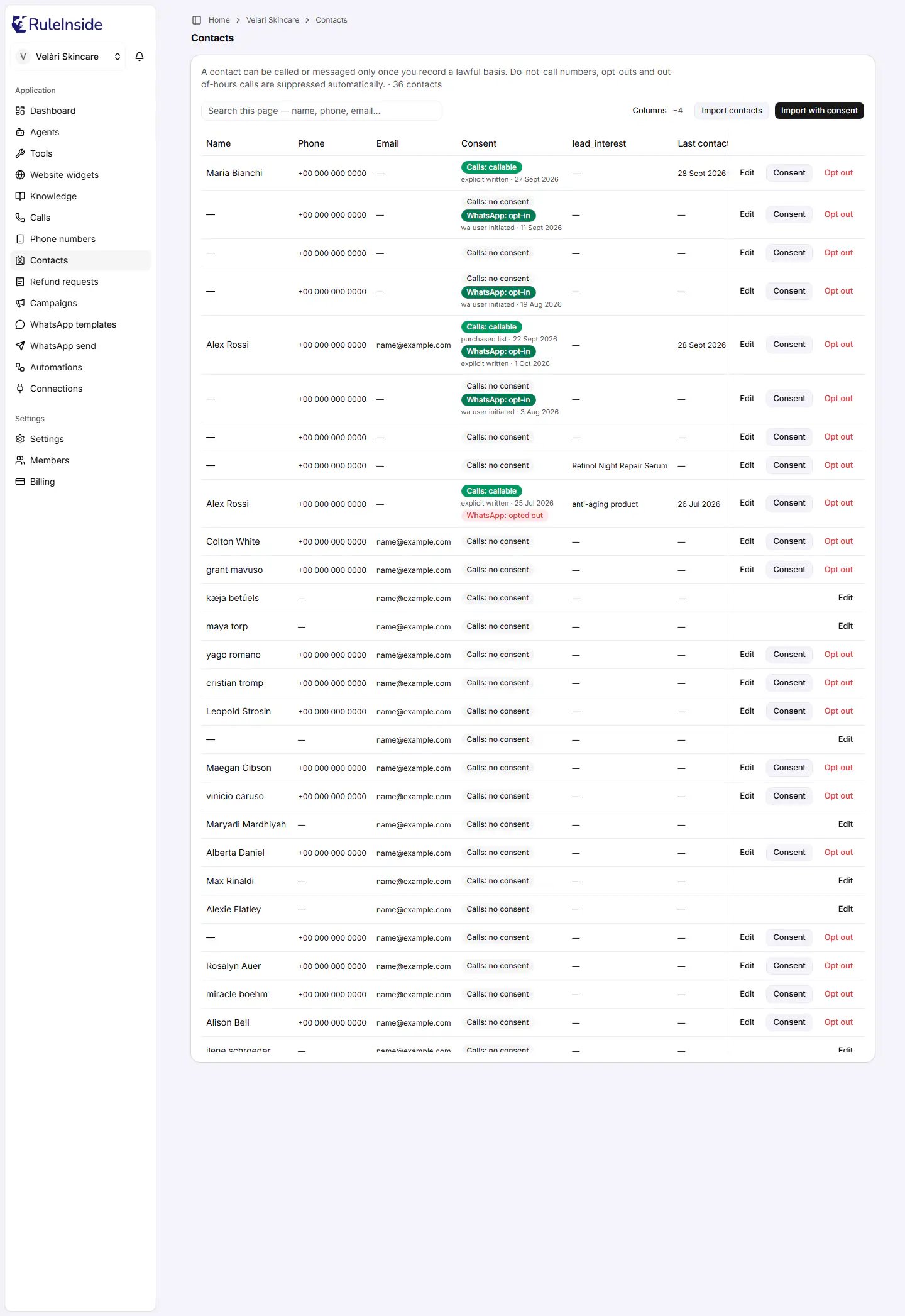
The Contacts page, with a consent badge for each contact.
Two words used on this page
- Lawful basis: the reason you are allowed to contact a person, for example “they ticked a box at checkout” or “they are an existing customer”. You record which basis you rely on for each contact. RuleInside does not check that the basis is true; you are responsible for it.
- Consent: on a contact, consent means you have recorded a lawful basis for one channel. Phone calls and WhatsApp are recorded separately, and one never implies the other.
How a contact becomes reachable
A newly imported contact cannot be called or messaged. It becomes reachable on a channel only once a lawful basis is recorded for that channel. Even then, every call and every message is checked at the moment it is sent:- your store’s Calling consent confirmation;
- the person has not opted out;
- the number is not on your do-not-call list;
- consent is recorded for that channel;
- it is inside your calling hours (calls only);
- the person has not been contacted too often, and your account is within its daily limit.
Who can do what here
The buttons at the top
- Columns opens the Columns panel, where you choose what you see and owners manage the workspace’s custom fields. When columns are hidden, the button shows how many, for example “Columns -2”. See Showing, hiding and adding columns.
- Import contacts imports a CSV. The people arrive as Calls: no consent. Owners only.
- Import with consent imports a CSV and records a lawful basis to call for everyone in it. Owners only.
The list
The list shows 50 contacts per page, newest first. When there is more than one page, “Page 1 of 3” appears with Previous and Next (greyed out on the first and last page). The header row stays visible while you scroll.Searching
The Search this page box appears when there are contacts. It searches only the contacts on the current page (up to 50), by name, phone, email and calling basis. To find someone on another page, move to that page with Previous or Next and search again.When the list is not shown
Store accounts to review
Sometimes a shopper creates or updates an account on your store with an email address that matches an older contact who is not linked to any store account. RuleInside does not link them on its own: it shows the owner a suggestion above the list, titled for example 1 store account to review. Only owners see it, and only when there is something to decide. Each suggestion shows the contact (name, email and phone) and a line such as “Store account #123, seen” followed by the date the match was first seen. You have two buttons:- Link opens Link this contact to the store account?, which explains what linking does. Click Yes, link them to link, or Cancel. You see “Contact linked to the store account.”
- Not the same person dismisses the suggestion without changing the contact. You see “Marked as not the same person.” A dismissed suggestion does not come back.
Consent badges
Each contact shows a Calls badge. A WhatsApp badge appears only when there is something to say about WhatsApp.The buttons on each contact
On a wide screen each contact shows up to three buttons. On a narrow screen, such as a phone, they collapse into one ”…” button that opens a menu with the same choices, with Opt out in red at the bottom.Recording consent for one contact
Use Record consent to record, or replace, the lawful basis for one contact on calls or on WhatsApp. Owners only. The dialog shows the contact’s name and number, with “record the lawful basis on which your agents may contact this person on the channel you choose. You are responsible for having that basis.”- “Consent recorded - this contact can now be called.”
- “Consent recorded - you can now message this contact on WhatsApp.”
- “No change (the number could not be recorded).” Nothing was written.
- “Could not record consent.” or a more specific message, for example when the stored number cannot be put in international format.
- “There is no channel available for this contact right now - they have opted out, or the lawful-basis list could not be loaded.” Refresh the page; if the person has opted out of both channels, consent cannot be recorded.
- “These are the options for a different channel, so consent cannot be recorded here right now. Please reload the page, and contact support if it keeps happening.” The save button stays greyed out.
Lawful bases
The statement for Existing customer relationship
The statement for Existing customer relationship
The statement for Purchased marketing list
The statement for Purchased marketing list
Editing a contact
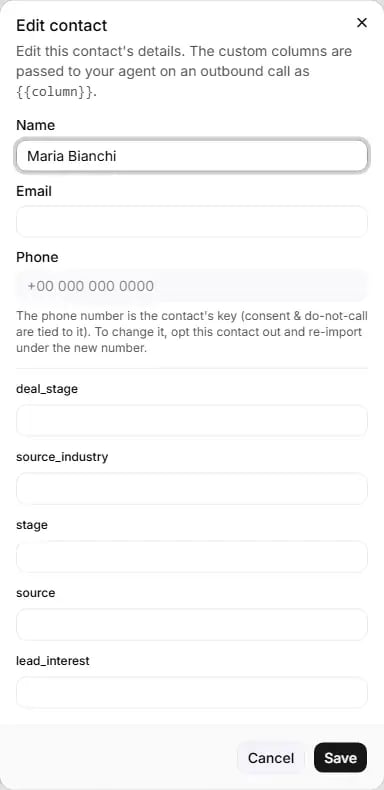
Edit contact: name, email and custom fields can be changed; the phone number cannot.
Opting a contact out
Use Opt out when a person asks not to be contacted. Any member can do it. The confirmation, Opt this contact out?, reads: “+15551234567 will be added to your do-not-call list for both calls and WhatsApp, and any consent on either channel will be revoked. This suppression survives a re-import and cannot be reversed from the portal. On WhatsApp, the customer can opt back in themselves by replying START.” Buttons: Cancel closes without changing anything. Opt out opts the contact out straight away. What happens when you click Opt out:- The contact is opted out of calls and WhatsApp, and any consent on either channel is removed.
- The number is added to your do-not-call list for calls and for WhatsApp.
- Any calls already scheduled for the contact are cancelled, and any WhatsApp messages waiting to be sent to them are stopped.
- A record is kept for each channel.
- You see “Contact opted out - they will not be contacted again on calls or WhatsApp.”
Your do-not-call list
Your store has a do-not-call list, kept separately for calls and for WhatsApp, and checked before every call and every message. There is no page in the portal to view or edit it. Numbers are added to it when:- someone uses Opt out on a contact (calls and WhatsApp);
- a person says during a call that they do not want to be called (calls);
- a person replies STOP on WhatsApp (calls and WhatsApp). The whole message must be the word STOP, in any letter case, or a quick-reply button that says STOP. “Stop calling me” does not count;
- your own system sends a “do not call” request through a Connection (calls);
- your system uses the RuleInside API.
Common questions
I imported my customers, but nobody gets called.
I imported my customers, but nobody gets called.
Can a member of my team import or record consent?
Can a member of my team import or record consent?
Can I undo an opt-out?
Can I undo an opt-out?
Does Opt out also stop WhatsApp?
Does Opt out also stop WhatsApp?
A customer opted out of calls on the phone. How do I stop WhatsApp too?
A customer opted out of calls on the phone. How do I stop WhatsApp too?
Does consent to call let me send WhatsApp messages?
Does consent to call let me send WhatsApp messages?
Why can't I choose Existing customer relationship for WhatsApp?
Why can't I choose Existing customer relationship for WhatsApp?
Can I take consent away without opting the person out?
Can I take consent away without opting the person out?
Does RuleInside check that my lawful basis is real?
Does RuleInside check that my lawful basis is real?
How do I change a contact's phone number?
How do I change a contact's phone number?
+ and no spaces, for
example +15551234567.Search does not find someone I know is there.
Search does not find someone I know is there.
Some contacts have no phone number.
Some contacts have no phone number.
What does Last contacted mean?
What does Last contacted mean?