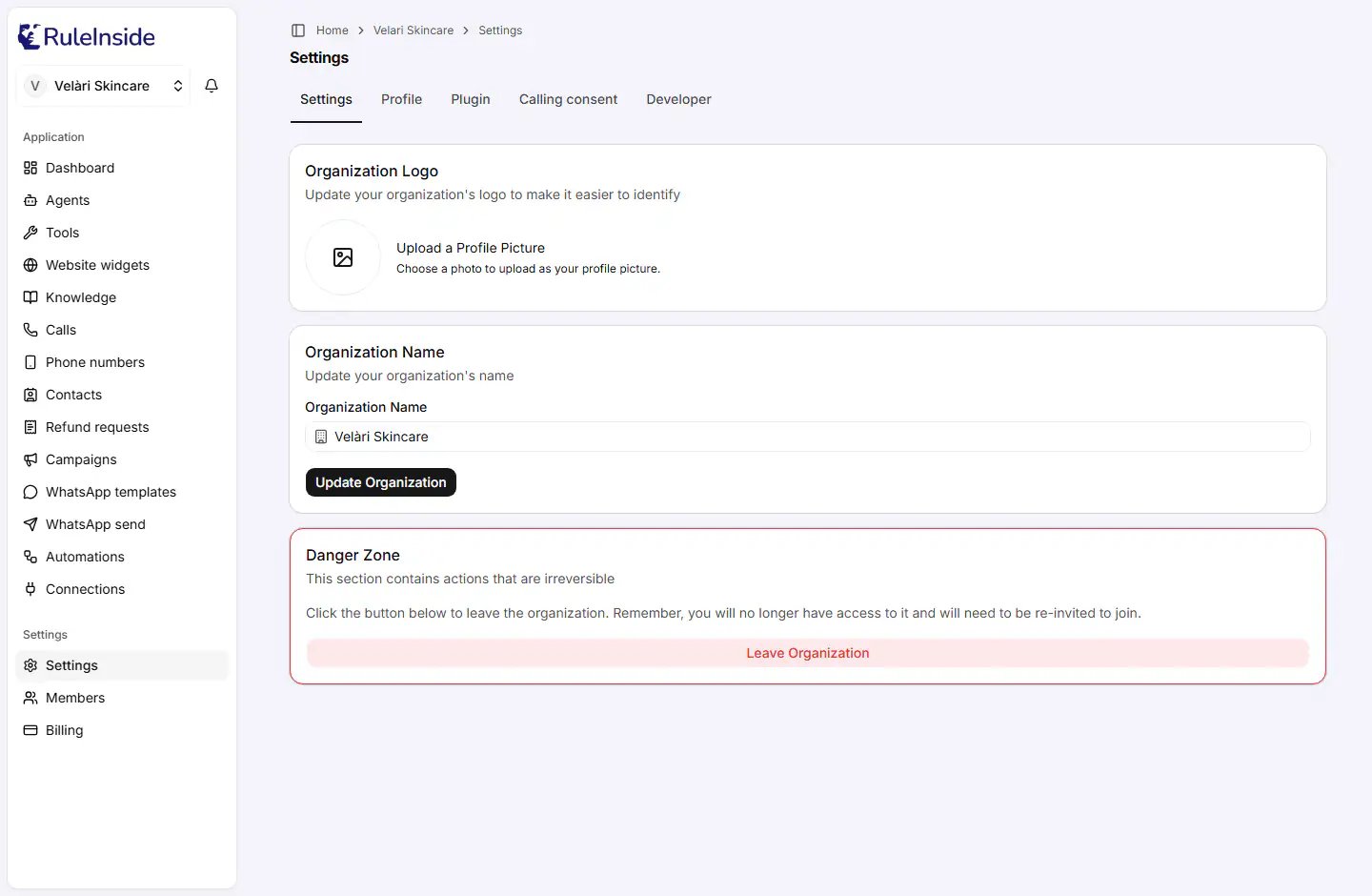
The Settings tab: organization logo, organization name and the Danger Zone.
Who can change these settings
- Everyone in the organization can open this tab.
- Only the primary owner can save a new name or logo. Anyone else can type in the form, but saving shows “Could not update Organization. Please try again.” See Who can do what.
- Leaving is open to everyone except the primary owner.
Organization Logo
The Organization Logo card sets the picture that identifies your organization. It appears, for example, on the page where an invited colleague accepts their invitation.- Click the uploader and choose an image file. The uploader’s text reads Upload a Profile Picture: it is the same control as on your personal profile, but here it sets the organization’s logo.
- Choosing a new image replaces the old one. Clearing it removes the logo.
- You see “Updating Organization…” and then “Organization successfully updated”.
Organization Name
The Organization Name card holds one field, Organization Name, and the Update Organization button.
Accented letters such as é or ü are fine.
Names in other scripts
If the name contains Cyrillic, Hebrew, Arabic, Thai, Korean, Japanese or Chinese characters, a second field appears: Organization URL. It sets the short name used in your web address, and it is required in that case.- Only lowercase English letters (a to z), numbers (0 to 9) and single hyphens, 2 to 50 characters. Example:
my-organization-name. - It cannot be
settingsorbilling. - It must not already be taken. Otherwise you see “This URL is already taken. Please choose a different one.”
Renaming changes your web address
If the new address is already used by another organization, a number is added to the end of it.Danger Zone
The Danger Zone card holds actions that cannot be undone. What you see depends on your role.Leaving the organization
Owners and members who are not the primary owner see Leave Organization.1
Click Leave Organization
The dialog Leaving Organization opens.
2
Type LEAVE
In the field Please type LEAVE to confirm leaving the organization., type
LEAVE in capital letters.3
Confirm
Click Leave Organization, or Cancel to stay.
If you are the primary owner
The primary owner has no Leave Organization option. To leave, first hand the organization to someone else with Transfer Ownership on the Members page. You then keep the owner role and can leave like anyone else.Common questions
I can't change our company name.
I can't change our company name.
Only the primary owner can. Check the Members page for the person with the Primary Owner badge
and ask them, or ask them to transfer ownership to you.
After renaming, my bookmark no longer works.
After renaming, my bookmark no longer works.
That is expected: the web address follows the name. Open the portal from the start page and bookmark the new
address.
How do I leave?
How do I leave?
Settings, Danger Zone, Leave Organization, then type
LEAVE. If you are the primary owner, transfer
ownership first.How do I close our RuleInside account?
How do I close our RuleInside account?
Cancel your plan on Billing. Leaving the organization or deleting your own
login does not stop billing. Contact us if you need anything else closed.
Can I change the logo without changing the name?
Can I change the logo without changing the name?
Yes. The logo and the name are saved separately. Only the name changes your web address.